
Real-Time Occupancy Monitoring for Capacity Compliance
What if staying within capacity depended on more than seeing a live number? Real-time occupancy monitoring for capacity compliance can show when a space is nearing its defined limit, but a count is useful only when it prompts a clear operational response. Manual counts can quickly fall behind during busy periods, leaving teams without a current view of changing occupancy.
Capacity management works best as an operating loop: understand the applicable limit, monitor occupancy, set meaningful thresholds, and connect them to practical response procedures. This guide explains how occupancy insights can support decisions across Australian retail, shopping centres, transportation, offices and events, while complementing venue procedures rather than replacing them. It also covers privacy-conscious monitoring: Footfall Australia’s fully managed service uses existing CCTV, masks data at the source, and collects or stores no personally identifiable information. You’ll learn how interpreted occupancy insights can help teams act with clarity.
Key Takeaways
- Real-time occupancy monitoring for capacity compliance shows how many people are present, while the venue’s applicable limit must be established separately.
- Build a practical response workflow: establish the capacity basis, monitor occupancy, review changes, and follow established procedures.
- Use occupancy trends to inform operational decisions, while keeping venue procedures central to how teams respond.
- Footfall Australia’s fully managed service uses existing CCTV, masks data at the source, and collects or stores no personally identifiable information.
Real-Time Occupancy Monitoring for Capacity Compliance: What the Live Count Shows
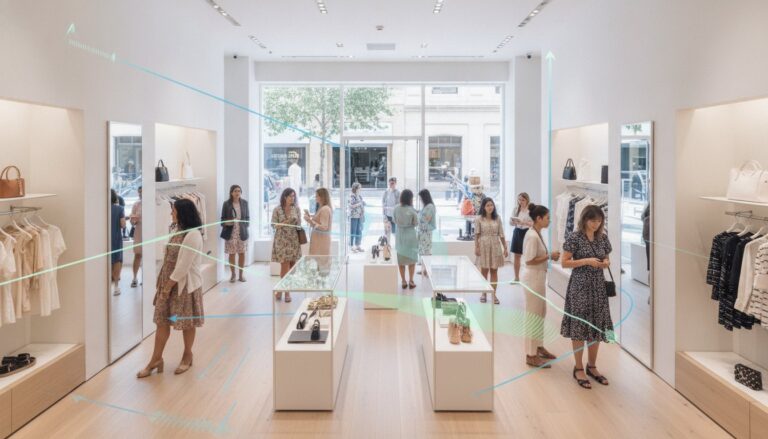
Occupancy monitoring tracks how many people are present in a defined space over time. By accounting for movement into and out of an area, a counting system can provide an updated estimate of the number currently inside. This gives teams a clearer view of changing activity than occasional manual counts, which may be out of date between checks.
Occupancy data shows how many people are present; the venue’s applicable limit defines how many may be present. A live count supports awareness, but it does not determine a permitted capacity. Establish the relevant limit separately, then use venue procedures to guide decisions.
How a live occupancy count supports capacity awareness
As people enter and leave, the system uses those movements to update the current count. Teams can compare occupancy with operational thresholds, spot a rising trend, and prepare an appropriate response. The value is not simply the number on a display. It is the ability to see how occupancy changes and consider that information in context.
For example, a retail team might see visitor numbers building during a busy period, while an office team may notice occupancy shifting around arrival and departure times. To interpret these patterns, be clear about the space being measured and which entrances and exits are included. A count is only meaningful when its boundaries match the area the team is managing. Occupancy sensors can serve different purposes; the Occupancy Sensor overview describes common sensor applications.
For a deeper look at how counting technologies work across physical environments, see the people counting technology guide. Understanding what the count represents helps teams use real-time occupancy monitoring for capacity compliance as an operational input, not as a substitute for a venue’s capacity assessment or response procedures.
From Live Occupancy Counts to Capacity Response: A Practical Workflow
Real-time occupancy monitoring for capacity compliance is most useful when teams connect the count to a defined process. A live figure can inform decisions, but it does not set a venue’s permitted capacity, guarantee compliance, or replace operational procedures. Start with the capacity basis that applies to the specific venue and its activities, then agree on how staff will use occupancy information.
- Establish the applicable limit. Identify the capacity basis for the venue and the activities taking place. Avoid treating a generic threshold as suitable for every space.
- Define the area being monitored. Make sure the count relates to the space whose occupancy the team needs to manage, including the relevant entrances and exits.
- Monitor occupancy. Use the count to maintain an operational view of how many people are present.
- Review changes. Note whether occupancy is rising, falling, or holding steady, and consider the pattern alongside the venue’s operating context.
- Follow venue procedures. Use agreed responsibilities and response steps when occupancy approaches or reaches a defined threshold.
Connect an occupancy threshold to a clear team response
A threshold is more useful when it tells the team what to do. Venue procedures can define an early response as occupancy approaches a limit, such as asking a designated team member to review the count or prepare the next operational step. They should also specify who acts when a threshold is reached, how the response is communicated, and when normal operations can resume.
After a busy period, review how occupancy changed and whether the response was clear and timely. Consider whether the count covered the intended area and whether the team knew who was responsible for each step. The footfall data analysis guide explores how to turn validated information into practical decisions. For interpreted occupancy insights that support operational planning, explore Footfall Australia’s managed service.

Privacy-First, Fully Managed Occupancy Monitoring with Footfall Australia
Real-time occupancy monitoring for capacity compliance depends on useful information and a clear understanding of how that information is handled. Footfall Australia provides a fully managed Visitor & Space Intelligence Service using existing CCTV infrastructure. The service covers design, installation, monitoring, maintenance, data validation, reporting and support, so organisations can receive interpreted insights without managing a separate hardware operation.
Privacy is built into the data approach: data is masked at the source, and no personally identifiable information (PII) is collected or stored. This allows organisations to use occupancy insights while keeping privacy central to monitoring operations.
Interpreted occupancy insights without hardware management
Footfall Australia provides interpreted insights, so clients do not need to manage hardware or make sense of raw data themselves. Validated, clearly reported information can help teams understand occupancy patterns and inform operational decisions, while their own venue procedures remain the basis for action.
The service supports Retail, Shopping Centres, Transportation, Offices and Events. In high-demand transit hubs like airports where passenger flow connects directly to facility operations, firms such as AAC LTD | All About Control provide mission-critical control systems to keep complex environments running smoothly. In each setting, understanding how people use a space can inform planning and day-to-day management. To make the information relevant, connect it to a specific operational question, such as when occupancy tends to rise or which periods require closer attention. Insights should be considered in the context of the space and the decisions teams need to make.
Organisations can use managed occupancy intelligence to put occupancy information to practical use. The fully managed approach brings together design, installation, monitoring, maintenance, data validation, reporting and support, with insights teams can use without taking on hardware management or raw-data interpretation.
Build a More Informed Operating Rhythm
Choose an operational decision that would benefit from a clearer view of how people move through your space. Start with a defined question, such as when teams need to prepare for changing demand. Then align occupancy insights with the procedures staff already follow. That focus makes real-time occupancy monitoring for capacity compliance useful beyond a live reading.
Footfall Australia’s fully managed service uses existing CCTV, with installation and maintenance included in the service. Data is masked at the source, and no PII is collected or stored. Monitoring, data validation, interpreted reporting and support help turn measured activity into information teams can use.
Explore Footfall Australia’s fully managed visitor and space intelligence service to see how occupancy insights can support your organisation’s operational decisions.
Frequently Asked Questions
Who determines the capacity threshold used for real-time occupancy monitoring?
The threshold should reflect the capacity basis for the specific venue and its operating requirements, not a figure generated by the monitoring system. Establish the applicable basis for the venue, then use real-time occupancy monitoring for capacity compliance to compare observed occupancy with the selected threshold. Capacity decisions should remain grounded in the venue’s circumstances and procedures.
How often should a venue review its occupancy threshold?
Review the threshold when relevant venue conditions or operating arrangements change, following the organisation’s established review process. For example, a change in how a space is used may prompt a fresh assessment of whether the existing basis still applies. The appropriate frequency depends on the venue and its requirements. Occupancy readings can guide day-to-day decisions, but they cannot establish whether the threshold remains suitable.
Can real-time occupancy monitoring be used in offices, shopping centres, and events?
Yes. Footfall Australia provides occupancy intelligence for offices, shopping centres and events, as well as retail and transportation environments. The information can help teams understand how people use a space, but monitoring needs vary with each site’s layout, movement patterns and operational requirements. For workplace environments, reviewing resources on smart office technology Abu Dhabi highlights how access control and automated space monitoring operate together. A setup suited to an office may not translate directly to an event or shopping centre, so interpret insights in the context of that venue.