
People Counter Guide for Australian Businesses (2026)
Does your current footfall data reflect actual human behavior, or just the physical limitations of your sensor’s placement? Many Australian business owners recognize that physical metrics are essential for growth, yet they hesitate to commit due to the technical complexity of a professional people counter installation. It’s a valid concern; a system that’s poorly calibrated or incorrectly wired provides little more than digital noise.
This guide clarifies the path to achieving 98%+ data accuracy for your facility. We’ll outline the exact technical requirements, from AS/CA S009:2020 cabling compliance to the strategic positioning of the FootfallCam Pro2. You’ll learn how to leverage Power-over-Ethernet technology to minimize business disruption while ensuring your V9 software integrates seamlessly with your physical environment. By following this structured roadmap, you can transform raw movement into reliable business intelligence that empowers every operational decision you make.
Key Takeaways
- Achieve peak data integrity by implementing a strict 90-degree downward mounting angle to eliminate depth perception errors.
- Streamline your people counter installation by using Power-over-Ethernet (PoE) technology, which combines power and data into a single cable to minimize operational disruption.
- Ensure your network infrastructure supports the 802.3af standard for seamless hardware integration and high-speed data transmission.
- Validate your investment through a rigorous tuning phase where AI patterns are cross-referenced with manual video counts to guarantee 98%+ accuracy.
Strategic Placement: Maximising People Counter Accuracy from Day One
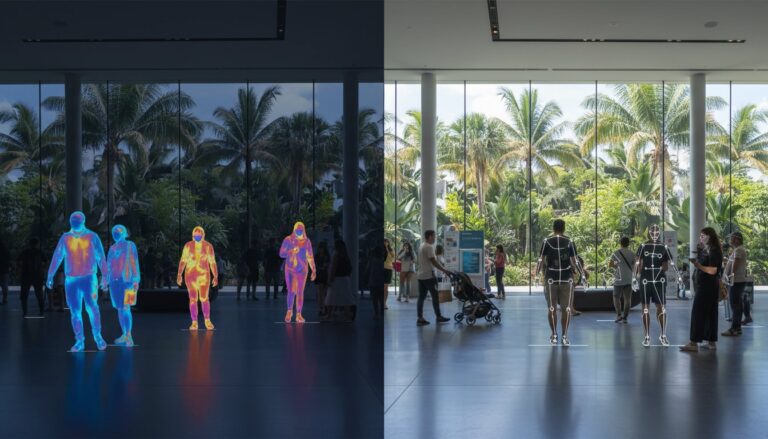
Strategic placement determines whether your analytics provide actionable insight or misleading noise. Achieving 98%+ accuracy requires a vertical, 90-degree downward angle at the entrance. This orientation allows the AI to distinguish between individuals and objects with high precision. Angled installations often suffer from occlusion, where one person hides another, leading to undercounts. Modern People counter technologies rely on this top-down perspective to map movement as a sequence of human actions rather than static shapes.
Successful people counter installation depends on the “1-metre rule.” Position the sensor at least one metre away from the door line to prevent “ghost” counts caused by internal store activity or staff members lingering near the entrance. You must also calculate the coverage width accurately. If your entrance exceeds the sensor’s field of view, you’ll need multiple units to ensure no footfall is missed. Environmental variables like swinging doors or high-contrast flooring can also compromise data integrity if not managed during the initial setup.
Height and Clearance: The Science of the Bird’s Eye View
The FootfallCam Pro2 is engineered for mounting heights between 2.1m and 4.5m. A higher ceiling increases the width of the counting zone but requires more robust AI processing to maintain detail. Conversely, lower ceilings provide a tighter field of view, which might necessitate additional sensors for wide entryways. Higher mounting positions expand the detection area while requiring precise calibration to maintain the 98%+ accuracy standard during a people counter installation.
The Installation Process: Power-over-Ethernet (PoE) and Connectivity
Physical setup transitions from theory to execution through Power-over-Ethernet (PoE) technology. This one-cable solution serves as the backbone of a professional people counter installation, as it delivers both power and data via a single Cat5e or Cat6 cable. Unlike battery-powered alternatives that often suffer from signal dropouts and high maintenance overhead, a wired PoE connection ensures constant uptime. Your network switch or router must support the IEEE 802.3af standard to provide the necessary power for enterprise-grade sensors.
Adherence to Australian commercial networking standards is essential for long-term stability. You must follow the TIA/EIA 568B colour code during cable termination to prevent crosstalk and signal attenuation. Once the FootfallCam Pro2 receives power, it utilizes a plug-and-play architecture to automatically sync with the V9 software. This automation removes the need for complex manual IP assignments. It allows your team to focus on data utility rather than technical troubleshooting.
Wiring and Network Configuration: Simplifying Complexity
Reliable connectivity begins with precise cable termination. Strip the outer jacket, arrange the internal pairs according to the 568B sequence, and use a high-quality crimping tool to secure the RJ45 connector. Always use a cable tester to verify continuity before final mounting. If your security protocols are strict, configure your firewall to whitelist the FootfallCam cloud portal for secure outbound data transmission. For sites with existing hardware, the FootfallCam Centroid can repurpose legacy CCTV feeds into intelligent footfall sensors. If you’re unsure about your local network readiness, consult with a specialist to ensure your infrastructure meets the required specifications.

Beyond the Hardware: Calibration, Tuning, and Data Validation
Mounting the sensor is only the first half of a successful people counter installation. The subsequent “Tuning” phase allows the onboard AI to adapt to the specific lighting conditions and traffic flows of your Australian storefront. It’s a critical step. This process ensures the device distinguishes correctly between customers, children, and staff groups. To guarantee the promised 98%+ accuracy, you must implement a verification protocol. This involves cross-referencing short intervals of manual video counts against the system’s recorded data. Data integrity is non-negotiable.
Once calibrated, the FootfallCam V9 Software dashboard provides the central interface for real-time traffic monitoring. You can configure custom KPIs and heatmaps to visualize human movement patterns throughout your space. For maximum utility, integrate this footfall data directly with your Point-of-Sale (POS) systems. By merging traffic volume with transaction counts, you can calculate sales conversion rates immediately. This empirical evidence allows managers to evaluate marketing efficacy and staff scheduling with absolute clarity. Logic replaces intuition.
Automatic Tuning and Health Checks: Ensuring Long-Term Reliability
Reliable analytics depend on consistent system performance. The FootfallCam Pro2 performs automated health checks every five minutes to detect potential network interruptions or hardware faults. These automated alerts prevent data gaps during peak trading periods by notifying your team the moment an issue arises. For sustained data integrity, investing in professional people counter support ensures your system remains optimized as your physical environment evolves. This proactive approach transforms a simple people counter installation into a permanent strategic asset.
Driving Operational Excellence Through Data Integrity
Establish a foundation of 98% accuracy by prioritising a professional people counter installation. This transition to evidence-based management empowers you to optimise staffing, refine marketing strategies, and understand the specific narrative of human behaviour within your space. Implementing a robust footfall analytics system requires more than just mounting hardware; it demands a precise focus on vertical alignment and compliant network infrastructure to transform physical movement into verified statistics that you don’t have to second-guess.
Trusted by Australian retailers since 2004, our national partner network provides the on-site support needed to ensure your system performs at its peak from day one. Ready to optimise your space? Contact Footfall Australia for a professional installation quote. We look forward to helping you master your physical environment through data-driven clarity.
Frequently Asked Questions
Where exactly should a people counter be installed for the best results?
For the best results, install the device directly above the centre of your primary entrance at a 90-degree downward angle. This top-down perspective is essential for the AI to distinguish individuals accurately. Ensure the mounting height is between 2.1m and 4.5m and maintain at least one metre of clearance from the door line to prevent detection errors caused by staff movements.
Can I install the FootfallCam Pro2 myself or do I need a professional?
While the hardware supports a “one-cable” setup, a professional people counter installation is recommended to ensure 98%+ accuracy. Professional installers handle complex tasks like precise sensor calibration and compliance with Australian cabling standards. Expert setup also includes a rigorous tuning phase, where the AI is adjusted to your specific environment, ensuring your data remains a reliable strategic asset.
What type of cabling is required for a professional people counting system?
Professional systems require high-quality Cat5e or Cat6 Ethernet cabling terminated using the TIA/EIA 568B colour code. These cables deliver power and data via a PoE switch supporting the 802.3af standard. This configuration follows the AS/CA S009:2020 standard, which is a legal requirement for Australian cablers. Wired setups eliminate battery maintenance and prevent data dropouts associated with Wi-Fi interference.
What happens if the internet goes down? Will I lose my counting data?
You won’t lose your footfall data if the internet connection is interrupted. The FootfallCam Pro2 features internal storage that records and buffers human movement metrics locally. Once the network connection is restored, the device automatically synchronises the stored data with the V9 software cloud portal. This ensures your analytics remain continuous and complete, even during unexpected local network outages or ISP maintenance periods.