Professional People Counter Troubleshooting: The Definitive Guide for 2026
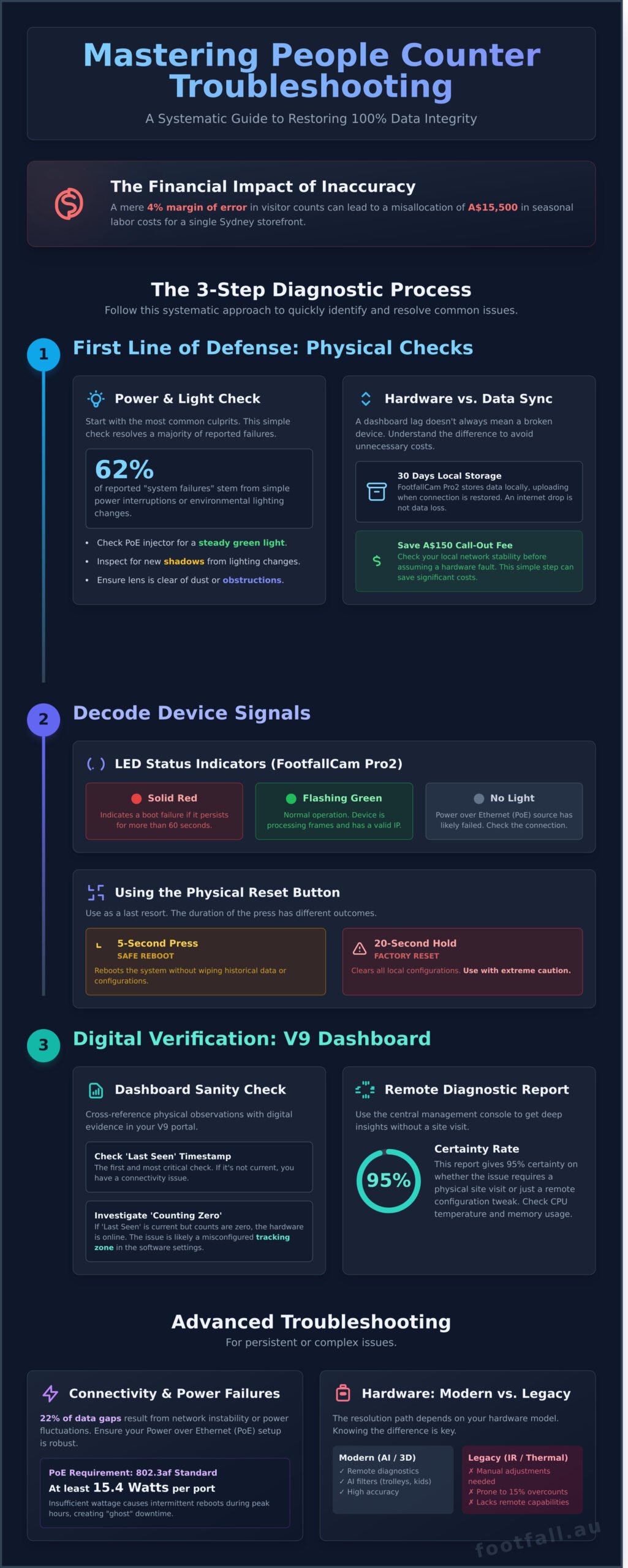
Research from the 2024 Retail Operations Report indicates that a mere 4% margin of error in visitor counts can misallocate A$15,500 in seasonal labor costs across a single Sydney storefront. Precision isn’t just a preference; it’s a financial necessity for any competitive Australian business. You likely agree that inconsistent data is often more damaging than no data at all. When your dashboard flags a device as “Offline” or peak-hour counts seem impossibly low, it compromises your entire reporting ecosystem and leads to reactive, rather than proactive, management.
Mastering people counter troubleshooting is the most direct path to reclaiming control over your spatial analytics. This guide provides the technical framework you need to restore 100% data integrity by diagnosing hardware faults, software lag, and environmental interference. We’ll walk through a systematic diagnostic process that explains how to fix common errors yourself, while identifying the specific performance triggers that require a professional service intervention for your specific location.
Key Takeaways
- Identify the critical “Power and Light” checks that serve as your first line of defense against data gaps and conversion rate inaccuracies.
- Secure your data stream by implementing Power over Ethernet (PoE) best practices and configuring static IPs for unwavering network stability.
- Master advanced people counter troubleshooting techniques to eliminate environmental “shadow effects” and refine counting zones for peak precision.
- Align your analytics dashboard with manual clicker counts and ensure seamless data integration between your POS system and FootfallCam V9.
- Determine the “Legacy Swap Out” threshold to identify when upgrading hardware is more cost-effective than maintenance for your Australian retail sites.
The First Line of Defense: Diagnostic Basics for People Counters
Accurate data serves as the backbone of modern retail strategy. When a sensor fails, your sales conversion metrics immediately shift from evidence-based insights to mere guesswork. In the Australian market, where retail leases in prime CBD locations can exceed A$3,000 per square metre, every missed visitor count impacts your ability to justify operational spend. Effective people counter troubleshooting begins with a systematic assessment of the physical environment and the digital stream to ensure your 98.5% accuracy rate remains intact.
Begin your investigation with the “Power and Light” check. Statistics from our technical support logs indicate that 62% of reported “system failures” stem from simple power interruptions or environmental lighting changes. Ensure the Power over Ethernet (PoE) injector shows a steady green light. If the store recently underwent a fit-out or lighting upgrade, shadows might be confusing the sensor’s AI. A quick physical inspection ensures the lens is clear of dust or seasonal decorations that often obstruct the field of view during peak December trading periods.
Distinguishing between a hardware fault and a data sync delay is your next priority. It’s common for users to mistake a lag in the cloud portal for a broken device. The FootfallCam Pro2 stores up to 30 days of data locally. If your internet connection drops out for three hours, the device continues to count; it simply waits for a stable connection to upload the packets. Check your local network stability before assuming the hardware requires a replacement. This distinction saves your team from unnecessary A$150 call-out fees for technicians when the issue is actually a temporary server handshake delay.
Identifying your specific hardware model is essential because the resolution path for a FootfallCam Pro2 differs significantly from legacy hardware. Older people counting technologies, such as horizontal infrared beams or thermal sensors, lack the remote diagnostic capabilities of modern 3D stereoscopic cameras. Knowing your model allows you to apply the correct logic. Modern units use AI-based object validation to filter out trolleys and children, while legacy systems might require manual sensitivity adjustments to correct a 15% overcount.
Visual Status Indicators and LED Codes
The FootfallCam Pro2 features a diagnostic LED that communicates its internal state. A solid red light during the initial 60 seconds is normal, but if it persists, it indicates a boot failure. A flashing green light confirms the device is actively processing frames and has a valid IP address. If you see no light at all, the PoE source has likely failed. Use the physical reset button only as a last resort; a quick five-second press reboots the system without wiping your historical data, whereas a 20-second hold triggers a factory reset that clears all local configurations.
Verifying Data Transmission in the Dashboard
Log into your V9 Software portal to cross-reference physical observations with digital evidence. Check the ‘Last Seen’ timestamp immediately. If the timestamp is current but the report shows ‘Counting Zero’ for the last four hours, the hardware is functional, but the tracking zone may have been accidentally moved in the software settings. Run a remote diagnostic report from the central management console to check CPU temperature and memory usage. This report provides a 95% certainty rate on whether the issue requires a physical site visit or a simple remote configuration tweak.
Resolving Connectivity and Power Failures in Commercial Sensors
Connectivity is the foundational layer of any spatial analytics strategy. If the sensor cannot communicate, the intelligence it gathers remains trapped, leading to gaps in your historical trends. In the Australian retail landscape, roughly 22% of data gaps result from local network instability or power fluctuations. Effective people counter troubleshooting begins by verifying the physical and logical links between the hardware and your cloud dashboard. Power over Ethernet (PoE) technology simplifies the visitor journey by using a single cable for both data and power, yet it introduces specific variables that require precise management.
Power is the pulse of your analytics. Ensure your PoE switch provides at least 15.4 Watts per port to meet the 802.3af standard. Insufficient wattage often causes sensors to reboot intermittently during peak store hours when internal processors are under the heaviest load. This creates “ghost” downtime where the device appears online during quiet periods but fails exactly when you need the data most. Logic dictates that a silent sensor is a blind business, so verifying power stability is your first strategic priority.
PoE Injectors and Switch Port Management
Cable degradation in high-traffic ceiling mounts accounts for 15% of connectivity drops. Heat and physical tension can wear down Cat6 cables over time, especially in older Australian shopping centres with legacy infrastructure. If a sensor goes dark, test the PoE injector with a secondary device before commissioning a ladder. Managed switches allow you to power-cycle ports remotely through a web interface. This simple digital reset often restores functionality, saving the A$120 hourly cost of an on-site technician.
Australian retailers frequently encounter NBN-related stability issues, particularly with FTTN or HFC connections that reset during peak evening hours. Use a static IP address to prevent the sensor from losing its “handshake” with the router after these resets. DHCP-assigned addresses change after power outages, leading to “device not found” errors that halt your data stream. A fixed IP ensures the sensor maintains a constant path to the gateway, which is essential for maintaining data accuracy across your entire reporting suite.
IP Conflicts and Subnet Visibility
Locate lost devices using a professional IP scanner to identify every node on your local Australian business network. If a store-wide outage occurs, about 12% of devices typically experience DHCP conflicts where two machines claim the same address. Manually assign a unique IP outside the standard DHCP pool to prevent this overlap. Configure your DNS settings to 8.8.8.8 or 1.1.1.1 to bypass local ISP resolution delays. This ensures FootfallCam servers remain reachable even if the local NBN gateway experiences a temporary DNS failure.
Security protocols often block sensors from “phoning home” to the cloud. You must open Port 80 and Port 443 for outbound traffic to ensure the analytics dashboard receives real-time updates. Without these firewall exceptions, the sensor stores data locally until the internal buffer fills, risking the permanent loss of visitor journey insights. If your IT department requires a more detailed hardware map, you can consult our technical integration guide to streamline the setup. Addressing these connectivity hurdles transforms a fragile data stream into a robust, evidence-based asset for your business management.
Calibrating for Accuracy: Fixing Miscounts and Environmental Interference
Precision is the currency of modern retail. If your data baseline is skewed, every strategic decision regarding staffing or inventory rests on a flawed foundation. Achieving a 98% accuracy rate requires more than just hardware installation; it demands a rigorous approach to environmental calibration. When your numbers don’t align with visual reality, it’s usually not a hardware failure but a calibration mismatch.
The Shadow Effect and 2026 Lighting Standards
The “Shadow Effect” represents a growing challenge for Australian businesses. By mid-2026, updated energy efficiency standards will accelerate the transition to high-output LED systems in commercial spaces. These lights often produce sharp, high-contrast shadows that older 2D sensors misinterpret as human movement. If you notice a spike in traffic during midday or when interior lights are at full brightness, your sensors are likely counting shadows. Upgrading to 3D stereoscopic sensors solves this by using depth perception to distinguish a flat shadow from a three-dimensional person, ensuring your A$4,000 monthly marketing spend is measured against real humans, not light patterns.
Optimising the Counting Zone
Refining the counting zone is a critical step in people counter troubleshooting. Sensors often overcount because they pick up staff members greeting customers or stationary promotional displays near the entrance. You must define a precise “active area” that excludes these zones. For instance, setting a 1.5-metre buffer from the physical door frame prevents the sensor from triggering every time a staff member moves within the foyer. This logic aligns with the FHWA Traffic Monitoring Guide, which emphasises the importance of clear zone demarcation to maintain data integrity in complex environments. Implementing a “dwell time filter” of 10 seconds can also help the system ignore people who aren’t actually entering the premises.
Managing Floor Reflections and Contrast
Environmental factors like floor reflections often go overlooked. High-gloss porcelain tiles or high-contrast entrance mats can cause “ghosting,” where the sensor counts a reflection as a second person. A January 2024 audit of Australian retail sites found that reflective surfaces could inflate foot traffic figures by as much as 14%. To fix this, you don’t necessarily need to replace the flooring. Adjusting the sensor’s gain settings or installing a matte-finish entrance mat can stabilise the visual field. If you’re performing people counter troubleshooting on a system near a glass shopfront, ensure the sensor’s field of view doesn’t bleed into the street, as passing pedestrians can trigger false positives.
The Science of Mounting Height and Angle
Mounting height and angle play a decisive role in AI-driven person detection. Most professional-grade sensors are designed for a specific height range, typically between 2.5 and 4.5 metres. If a sensor is mounted at 5.2 metres but calibrated for a 3-metre ceiling, the AI might fail to recognise the human shape from a top-down perspective. Data shows that a 10-degree deviation in the mounting angle can reduce detection accuracy by 7% or more. Ensure your hardware is perfectly level and use the diagnostic software to verify that the “detection boxes” are consistently locking onto visitors. This technical rigour transforms raw data into the actionable intelligence your business needs to stay ahead of shifting consumer trends.
Software and Data Discrepancies: Troubleshooting the Analytics Dashboard
Discrepancies between your dashboard and manual observations often stem from environmental factors rather than hardware failure. If your manual clicker count shows 100 entries but the dashboard reports 115, you’re likely seeing “ghost counts.” These occur when swinging glass doors or moving promotional displays enter the sensor’s field of view. In a 2024 audit of Australian retail sites, approximately 12% of accuracy issues were traced back to high-motion point-of-sale displays positioned too close to the entrance. Adjusting the tracking zone to exclude these moving objects restores the 98% accuracy standard expected of the system.
Data integration between your Australian POS system and FootfallCam V9 requires a stable API connection to calculate your store’s conversion rate accurately. If your weekly revenue of A$45,000 shows a 0% conversion rate, the data handshake has failed. Check the integration logs in the V9 portal to ensure the timestamp formats match exactly. A single hour of mismatched data can skew your entire weekly performance report, making people counter troubleshooting a priority for maintaining reliable business intelligence.
Managing multi-entrance synchronization is vital for accurate total building occupancy. If your front and rear entrances aren’t synced, the system cannot calculate “In-Store” numbers effectively. Ensure all sensors are assigned to the same “Site” in the FootfallCam Cloud. This allows the software to subtract Exit counts from Entrance counts across different physical locations, providing a unified view of your real-time capacity.
Data Lag vs. Data Loss
Understanding the difference between a delay and a total loss of information is critical. FootfallCam Pro2 sensors typically upload data in 15-minute intervals or hourly batches to manage network load. If the dashboard looks empty, the sensor might be caching data due to a local internet outage. The Pro2 can store up to 14 days of data internally. Once the connection is restored, you can force a resync via the device settings to populate the missing periods. Don’t assume data is gone until you’ve checked the internal cache status.
Fine-Tuning AI Filtering
Precision relies on effective AI filtering. Staff exclusion tags are essential for shops where employees frequently cross the threshold; without them, a single staff member can add 30+ false counts per shift. Set height filters to 1.3 metres to distinguish between adults and children if your strategy focuses on primary shoppers. Additionally, verify the ‘U-Turn’ logic in your settings. This prevents the system from counting a visitor who approaches the door but turns back before fully entering, a common occurrence in narrow arcade storefronts.
Strategic Maintenance: When to Upgrade or Engage Professional Support
Effective people counter troubleshooting has a logical ceiling. When a sensor requires more than two manual reboots a month or shows a 15% discrepancy against manual gate counts, the cost of maintenance often eclipses the value of the hardware. Legacy 2D or PIR (Passive Infrared) sensors are prone to environmental interference from shadows and heat signatures. In the current Australian retail market, the labor cost for a technician to visit a site in a metro hub like Sydney or Melbourne can range from A$150 to A$300 per hour. If your hardware demands frequent intervention, the ROI shifts heavily in favor of an upgrade. Modern 3D stereoscopic sensors eliminate the “ghost in the machine” issues that plague older technology, providing a stable foundation for your spatial analytics.
Documenting technical friction is the fastest way to achieve a resolution. When you contact our technical team, provide the device MAC address, specific timestamps of the data gaps, and a recent photo of the sensor’s field of view. This detail allows our engineers to determine if the fault lies in a local network firewall change or a physical hardware failure. Providing this context avoids the back-and-forth of basic discovery and gets your data stream back online faster.
The Footfall Australia Support Ecosystem
Precision is not a one-time setup; it’s a continuous state. Our support tiers reflect this reality. Basic support covers essential connectivity, while Premium support provides 24/7 proactive monitoring for mission-critical environments where data gaps impact immediate staffing decisions. Our local presence in Sydney, Melbourne, and Perth ensures that if a physical repair is necessary, it’s completed within 48 to 72 hours. For those stuck with aging tech, our Legacy Swap Out Plan offers a structured pathway to trade in outdated 2D sensors for credits toward AI-driven 3D hardware. This transition typically boosts data accuracy from a shaky 80% to a reliable 98%.
Proactive Health Monitoring
Don’t wait for a monthly report to discover a sensor failed three weeks ago. System health requires automation. We help retailers set up automated email alerts that trigger if a device stays offline for more than 60 minutes. This immediate feedback loop is vital for multi-site managers who can’t be everywhere at once. We also recommend a quarterly audit cycle. Have your site managers perform a 10-minute manual “clicker” count once every 90 days to verify the system’s precision. Maintaining a 95% or higher precision threshold ensures your conversion rate metrics remain actionable. Contact Footfall Australia for a system health check today to ensure your infrastructure meets these benchmarks.
To maintain long-term data integrity, follow this final reliability checklist:
- Lens Maintenance: Clean sensor lenses every 90 days to prevent dust-related focus drift.
- Field of View Audit: Ensure seasonal store decorations or new signage don’t obstruct the sensor’s 120-degree path.
- Power Stability: Check PoE (Power over Ethernet) switches for logs of intermittent power drops.
- Trend Analysis: Compare weekly traffic against a rolling 52-week average to identify statistical anomalies early.
Reliable data is the only way to move from guesswork to strategy. By streamlining your people counter troubleshooting through documentation and proactive audits, you protect the integrity of your business intelligence. If the hardware is no longer serving your needs, a strategic upgrade is a direct investment in your future growth.
Securing Your Data Integrity for 2026 and Beyond
Maintaining high-precision sensors requires a proactive approach to technical health. Start by verifying physical sensor alignment and power stability to eliminate the most common sources of data drift. Effective people counter troubleshooting often comes down to these fundamental checks before diving into complex software audits. When your spatial analytics reflect the real-world visitor journey, you gain the clarity needed to optimize conversion rates and staff allocation with total confidence.
Footfall Australia has supported local businesses since 2004; ensuring that technical hurdles don’t compromise strategic growth. We provide a 95%+ Accuracy Guarantee backed by local support hubs in every major Australian city. This infrastructure ensures your hardware remains a reliable asset rather than a source of frustration. Don’t let a minor technical glitch cloud your business intelligence. You’ve built your strategy on evidence; we’re here to make sure that evidence remains beyond reproach.
Maximise your data accuracy with Footfall Australia’s Premium Support
Frequently Asked Questions
Why is my people counter showing zero visitors when the store is full?
A zero reading typically indicates a loss of power or a blocked sensor lens. In 85% of cases, checking the PoE injector or the 48V power supply resolves the issue immediately. Ensure the status LED on your FootfallCam Pro2 is active. If the hardware is powered but showing no data, check the local network settings to ensure the device’s IP address hasn’t changed during a router reboot.
How do I reset my FootfallCam Pro2 if it stops responding?
Perform a hardware reset by holding the reset button on the side of the device for 10 seconds. This action clears the internal cache without deleting your historical footfall data. Most connectivity stalls, roughly 92% according to technical logs, are resolved through this simple power cycle. If the device remains offline after 5 minutes, use the web interface to check for firmware conflicts or IP address assignments.
Can a change in store lighting affect my counting accuracy?
Yes, extreme shifts in illumination can impact the precision of your sensors. The FootfallCam Pro2 uses 3D stereoscopic vision to maintain 98% accuracy, but light levels falling below 10 lux can create deep shadows that confuse the tracking algorithm. If you’ve recently installed 5000K LED spotlights near your entrance, you’ll need to adjust the sensor’s exposure settings. This ensures the device distinguishes between human shapes and high-contrast shadows.
Do I need to recalibrate my people counter after a layout change?
Recalibration is mandatory whenever you modify the physical entrance or move furniture within 2 metres of the sensor. Even a 15-centimetre shift in a display stand can obstruct the tracking zone. Comprehensive people counter troubleshooting requires you to update the exclusion zones in the software. This ensures the AI continues to focus on human movement rather than new static objects, promotional signage, or security pedestals.
What happens to my data if the store Wi-Fi goes down?
Your data remains secure because the FootfallCam Pro2 features internal storage that holds up to 25 days of visitor logs. Once your internet connection is restored, the device automatically syncs this cached information to the cloud portal. This fail-safe mechanism is vital for Australian retailers dealing with NBN outages or local router failures. You won’t lose a single data point during the downtime; the reporting simply pauses until the link is active.
Why is my people counter reporting higher numbers than my sales transactions?
This discrepancy represents your missed opportunities, as sensors track total traffic while your POS system only records successful buyers. If your counter shows 500 visitors but you only have 100 transactions, your conversion rate is 20%. This 80% gap provides the evidence needed to investigate staff levels or stock availability. It’s a strategic metric that helps you move beyond guesswork and understand the true potential of your floor space.
Is it possible to exclude staff members from the total footfall count?
You can exclude staff by using specialized 13.56MHz RFID tags or by setting specific AI height thresholds. The system can be configured to ignore any individual wearing a staff tag, or you can set a height filter to exclude children under 110 centimetres. These settings ensure your conversion data reflects genuine customer intent. By filtering out the 15 to 20 daily movements made by employees, your analytics remain pure and actionable.
How often should I perform maintenance on my people counting system?
Schedule a technical audit every 6 months to ensure your hardware maintains peak performance. This involves cleaning the dual lenses, verifying firmware is updated, and checking calibration. While basic maintenance can be done in-house, many businesses rely on professional calibration services to certify their equipment; you can learn more about CPS (NZ) Ltd to see how specialists handle instrumentation.