People Counter Troubleshooting: A Professional Guide to Data Continuity
A single hour of missing footfall data isn’t just a technical glitch; it’s a blind spot in your business strategy that can skew conversion rates and staffing models for weeks. You rely on these metrics to justify every operational decision, so encountering fragmented reports or offline sensors is more than a minor inconvenience. It’s a disruption to the empirical logic your organisation depends on. Troubleshooting people counter data gaps requires a systematic approach to identify whether the failure lies in network configurations, hardware fatigue, or battery depletion.
This comprehensive diagnostic guide will help you restore your business intelligence and secure a stable, 24/7 data flow. You’ll learn how to identify the root causes of inaccuracies and understand when it’s more efficient to upgrade via a Legacy Swap Out Plan than to patch failing hardware. We’ll examine practical steps to calibrate your FootfallCam Pro2 sensors for maximum precision, ensuring your physical environment remains as measurable and predictable as your digital assets. By following this structured path, you can move from data uncertainty to a high-accuracy system that empowers strategic growth.
Key Takeaways
- Learn how to differentiate between hardware failures and software synchronisation issues to pinpoint the exact cause of system downtime.
- Master a systematic approach for troubleshooting people counter data gaps by auditing network congestion and power stability.
- Identify and eliminate environmental “ghost triggers” like moving signage or HVAC airflow that compromise your counting accuracy.
- Implement manual video validation techniques to ensure your FootfallCam V9 software reports align with real-world human movement.
- Recognise when aging infrastructure requires a strategic upgrade through a Legacy Swap Out Plan to maintain long-term data continuity.
Initial Diagnostics: Identifying the Failure Point
When data stops flowing, your business loses its primary tool for objective decision-making. The first step in troubleshooting people counter data gaps involves a binary check: is the hardware physically dead, or is the software simply not receiving the transmission? Unlike older infrared beam systems that often fail due to a simple battery issue or a blocked sensor, modern people counter technology like the FootfallCam Pro2 operates as a sophisticated network device. These units require consistent voltage and a stable path to the cloud to maintain the integrity of your traffic narrative.
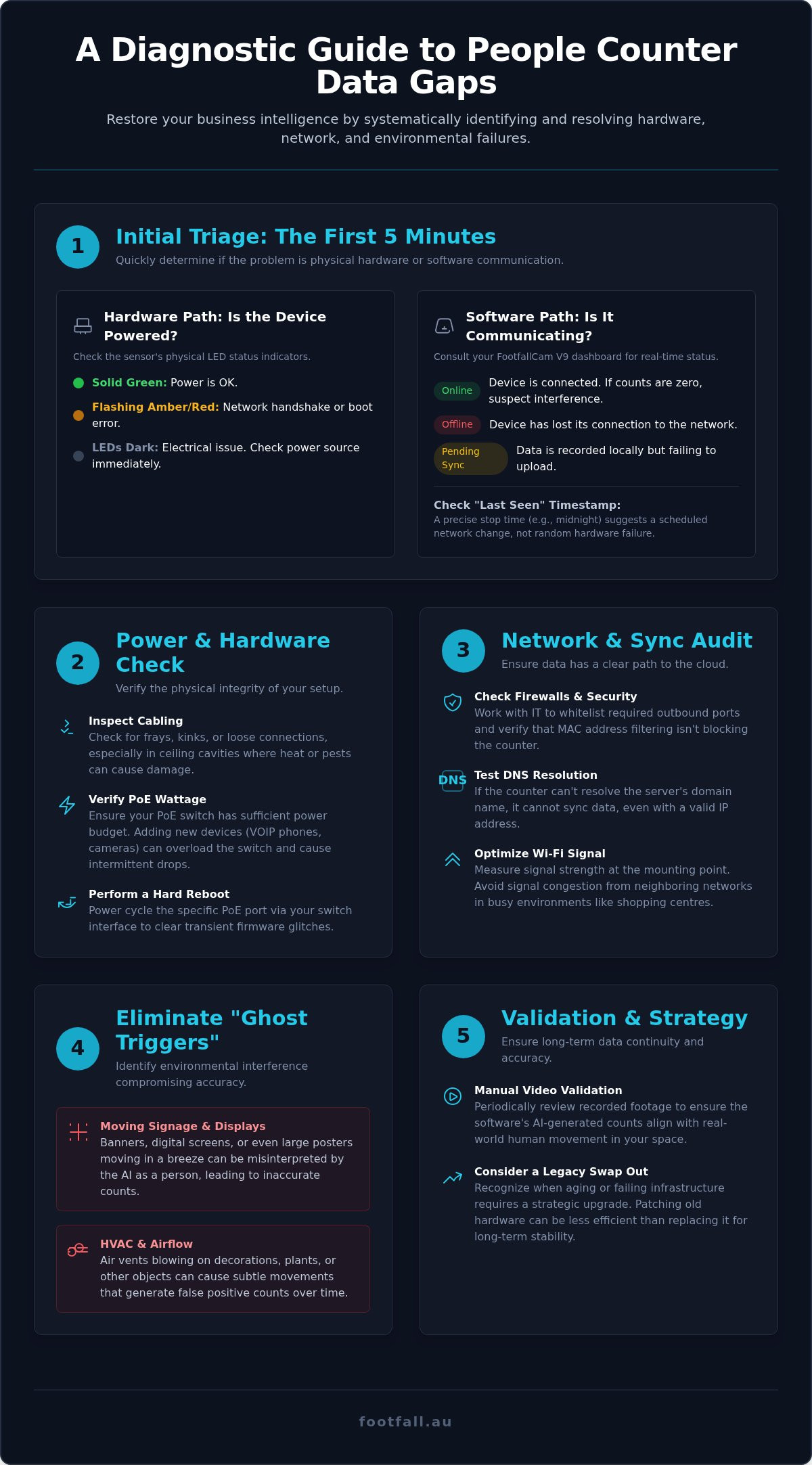
Start your diagnostic process by observing the device’s physical status indicators. The FootfallCam Pro2 uses specific LED patterns to communicate its health. A solid green light typically confirms power, while a flashing amber or red light often signals a network handshake failure or an internal boot error. If the LEDs are completely dark, the issue is almost certainly electrical. Simultaneously, consult your FootfallCam V9 dashboard. This platform acts as a central nervous system, providing real-time health checks that categorise devices as “Online,” “Offline,” or “Pending Sync.” If the dashboard shows the device as online but the traffic count remains at zero, the problem has likely shifted from connectivity to environmental interference or AI calibration.
Power and Hardware Health Checks
Inspect all physical cabling for frays, kinks, or tension, particularly in high-traffic entryways where structural vibrations can loosen connections over time. In many Australian retail environments, network cables are tucked into ceiling cavities where heat or pests can cause unexpected damage. Verify that your PoE (Power over Ethernet) switches are delivering sufficient wattage to the device. If you’ve recently added VOIP phones or security cameras to the same PoE switch, you may have exceeded the total power budget, causing the counter to drop off the network intermittently. Perform a hard reboot by power cycling the specific PoE port through your switch management interface; this often clears transient firmware glitches and restores the data stream without requiring a ladder.
Software vs. Hardware Status
Confirm the device’s presence on your local network by performing a standard ping test from a laptop on the same VLAN. If the counter responds to its IP address but doesn’t appear in your reports, the bottleneck is likely at the software layer. Check that your FootfallCam V9 software license is active, as an expired agreement can halt data processing even if the hardware remains functional. Finally, review the “Last Seen” timestamp in your analytics portal. If the data stopped at a precise time, such as midnight on a Sunday, it suggests a scheduled network update or a firewall configuration change rather than a random hardware failure. Pinpointing this exact moment is essential for troubleshooting people counter data gaps effectively.
Resolving Connectivity and Data Sync Issues
Connectivity serves as the essential bridge between raw physical movement and the actionable business intelligence you see on your dashboard. While legacy infrared beam counters might only require a simple pulse, modern AI-driven systems like the FootfallCam Pro2 demand a reliable data pipeline to sync high-resolution metadata. When troubleshooting people counter data gaps, you must ensure the device isn’t just powered on, but actively communicating with the cloud servers. Interruptions here often manifest as “packet loss” or “sync delays.” In these cases, the unit records data locally but fails to upload it, creating frustrating voids in your historical reporting.
Network Security and Firewalls
Enterprise-grade networks in Australia frequently employ robust firewall protocols that can inadvertently treat a people counter as an unauthorised device. Coordinate with your IT department to whitelist the specific outbound ports required for FootfallCam server communication. It’s also vital to verify that MAC address filtering isn’t blocking the counter from joining the network, which is a common issue during hardware refreshes. If the device has a valid IP address but still won’t sync, check for DNS resolution failures. If the counter can’t resolve the server’s domain name, it remains isolated, regardless of how strong the physical connection feels. Ensuring your firewall permits this traffic is a fundamental step in troubleshooting people counter data gaps effectively.
Wi-Fi Signal Optimisation
Wi-Fi congestion is a frequent culprit for intermittent data gaps, especially in shopping centres where guest networks and neighbouring businesses saturate the 2.4GHz and 5GHz bands. Measure the signal strength at the exact mounting point; a reading weaker than -70dBm often leads to frequent dropouts. For critical entry points, a wired PoE connection is always the superior choice for stability. If you must use Wi-Fi, ensure the SSID and security credentials haven’t been modified by local management without updating the device configuration. If your current network infrastructure is struggling to support modern AI sensors, you might consider our Premium Support Plan to have our technicians audit your configuration for peak performance.
Reliable data flow also depends on proper IP management and current software. Verify your DHCP settings to ensure the counter is assigned a valid, non-conflicting internal IP address. Once the connection is stable, use the FootfallCam V9 portal to check for and apply firmware updates. These updates often contain critical patches for network stack stability and data compression. By maintaining a clean communication path, you transform a flickering data stream into a robust narrative of human movement that your organisation can trust for long-term strategic planning.
Correcting Environmental and Physical Interference
Physical obstructions often distort the narrative of movement captured by your sensors, leading to fragmented datasets. While network issues cause total outages, environmental interference creates subtle, recurring errors that are harder to detect. Troubleshooting people counter data gaps in these scenarios requires a shift from digital diagnostics to a physical audit of the installation site. Even the most advanced AI system can be misled by a misplaced promotional banner or a vibrating mounting bracket.
Ghost triggers are a frequent source of data inflation or inconsistency. In many Australian retail spaces, powerful HVAC systems are essential for climate control. If a dangling promotional sign is positioned near a vent, the resulting movement can trigger the sensor’s AI, registering a “person” every time the air conditioner cycles on. Similarly, check the mounting stability of your FootfallCam Pro2. High-traffic entryways with heavy automatic doors can cause structural vibrations that subtly shift the camera angle over time. If the device’s field of view moves by even a few degrees, your pre-configured counting lines may no longer align with the actual walkway, causing significant data leakage.
Lens Maintenance and Obstructions
Keep your FootfallCam Pro2 hardware in peak condition by performing regular lens maintenance. Use a non-abrasive, anti-static cloth to clear dust and smudges that can soften the image and reduce AI detection sensitivity. In outdoor or semi-exposed environments, be particularly vigilant about insects or spider webs across the sensor housing. Spiders are attracted to the warmth of electronic devices, and a single web can create enough visual noise to obscure the sensor’s vision. Additionally, audit the area for seasonal decorations or temporary signage. A Christmas display or a large “Sale” banner that enters the device’s field of view acts as a permanent blind spot, directly contributing to troubleshooting people counter data gaps during your busiest trading periods.
Light and Glare Mitigation
The intensity of the Australian sun presents a unique challenge for video-based people counters. Extreme glare from polished mall floors or direct sunlight hitting a glass entryway can wash out the image, making it difficult for the sensor to maintain contrast. Consistent lighting is the primary factor in ensuring AI algorithms can accurately distinguish human silhouettes from background shadows. If your entry point experiences dramatic shifts in natural light throughout the day, adjust the counter’s dynamic range settings within the FootfallCam V9 software. These digital optimisations allow the sensor to compensate for high-contrast environments. For persistent glare issues, installing physical shields or repositioning the unit slightly can preserve the integrity of your data without compromising the aesthetic of your storefront.
Auditing Data Accuracy and AI Calibration
Accuracy isn’t just a metric; it’s the foundation of your entire data-driven logic. Even a seemingly marginal 5% error rate can fundamentally skew your calculated ROI and lead to suboptimal staffing decisions. When you’re troubleshooting people counter data gaps, you’re often looking for missing chunks of time, but “invisible” gaps caused by poor calibration are just as damaging to your strategy. These inaccuracies create a distorted narrative of human movement that undermines the utility of your reports. Ensuring your FootfallCam Pro2 is correctly calibrated for its specific environment is the only way to maintain empirical confidence in your findings.
The Manual Validation Process
Effective auditing begins with a manual validation test. Record a 15-minute video snippet directly through the FootfallCam interface to serve as your “ground truth.” By comparing this footage against the system’s generated counts, you can identify precisely where the logic is failing. Use the Live View feature to observe real-time tracking lines as visitors enter and exit. This visual feedback allows you to verify if the “In” and “Out” directions are correctly mapped to your physical entrance. If the system consistently undercounts or overcounting, the software’s understanding of the space likely needs a reset to better reflect the flow of traffic.
Fine-Tuning AI Parameters
Sophisticated people counting technology relies on precise environmental data to function at peak efficiency. One of the most common causes of inaccurate data is an incorrect ceiling height setting; the software must know the exact distance from the floor to the sensor to calculate person size correctly. Adjust your Min/Max Height filters to exclude shopping trolleys or small children if your specific reporting requirements demand it. You should also calibrate the Staff Exclusion feature to ensure your team’s movements don’t inflate your visitor traffic figures. Finally, ensure your active Counting Zone isn’t placed too close to the edge of the camera’s fisheye lens, where image distortion is highest and tracking accuracy naturally dips.
Refining these parameters ensures that every person counted represents a genuine opportunity for conversion. If your manual audit reveals persistent discrepancies that you can’t resolve through software settings, it may be time for a professional review. You can request a remote health check to have our specialists verify your AI calibration and ensure your data remains a reliable asset for your organisation. By prioritising accuracy over simple uptime, you guarantee that your business intelligence remains rooted in reality and ready for strategic application.
When to Engage Professional Support
Persistent technical friction often signals that your hardware has reached its logical end-of-life. While troubleshooting people counter data gaps can resolve configuration errors or minor environmental issues, it cannot fix degraded sensors or obsolete internal processors. If your system requires frequent reboots or displays inconsistent accuracy despite repeated calibrations, the cost of manual intervention may soon exceed the value of the data. Engaging professional support ensures you aren’t just patching symptoms but securing a long-term strategic asset for your organisation. It’s about moving from reactive repairs to a state of sustained data continuity.
The Legacy Swap Out Strategy
Many Australian businesses still rely on legacy infrared beam technology or aging thermal sensors that lack the sophisticated AI processing required for modern retail analytics. If your current third-party system is too outdated for FootfallCam V9 software integration, it’s time to evaluate a people counter support strategy that includes a hardware refresh. Our Legacy Swap Out Plan allows you to replace non-functional or inaccurate third-party units with FootfallCam Pro2 hardware. This transition provides a significant leap in accuracy and provides a seamless path to enterprise-grade reporting. This approach is often more cost-effective than attempting to repair proprietary systems that no longer receive firmware updates or manufacturer support.
Support Plan Benefits
Maintaining data integrity requires more than just a one-time fix; it demands ongoing vigilance and technical oversight. Footfall Australia offers both Basic and Premium support plans tailored to the specific operational needs of local organisations. While a Basic plan provides essential reactive assistance when things go wrong, our Premium Support Plan includes proactive health monitoring and regular remote data auditing. This proactive stance means our team often identifies and resolves potential failures before they manifest as significant data voids in your dashboard. Having a dedicated point of contact for your people counting systems Australia wide ensures rapid response times, which is critical for high-volume environments where every hour of missing data impacts your conversion metrics.
You don’t have to manage these complexities in isolation. With a national partner network established and active since 2004, we provide on-site technical assistance across all major Australian cities and regional hubs. Whether you’re troubleshooting people counter data gaps in a single flagship store or managing a nationwide rollout, our expertise ensures your business intelligence remains uninterrupted and empirically sound. Contact Footfall Australia for expert system support today to audit your current infrastructure and restore total confidence in your traffic data.
Securing the Future of Your Data Narrative
Maintaining a seamless flow of footfall intelligence is a continuous process of technical refinement. By systematically troubleshooting people counter data gaps, you protect the empirical foundation of your business strategy. Whether you’re recalibrating AI zones to account for environmental glare or auditing network stability, each diagnostic step ensures your decisions remain backed by evidence rather than intuition. Data is only valuable when it’s complete, and achieving 24/7 continuity is the hallmark of an optimised physical environment.
Footfall Australia has been a strategic partner in retail analytics since 2004, providing the technical expertise needed to navigate shifting behavioural trends. Our proprietary FootfallCam V9 analytics software and extensive national support network offer the transparency and reliability your organisation requires. Don’t let fragmented reports compromise your growth. You can ensure your data integrity with Footfall Australia support and gain the clarity needed to lead your market with confidence. It’s time to transform your technical challenges into a sustainable strategic advantage.
Frequently Asked Questions
Why is my people counter showing zero traffic when the store is open?
This issue typically stems from a complete connectivity failure or a physical obstruction blocking the sensor’s view. Start by checking the device status on your FootfallCam V9 dashboard; if the unit is listed as “Offline,” the network path is likely broken. If it’s “Online” but recording no movement, verify that the lens is clear and that no temporary signage has been placed directly in the counter’s field of vision.
How often should I clean the lens of my FootfallCam Pro2?
Perform a visual inspection monthly and clean the lens as required to maintain peak accuracy. In high-dust environments or semi-exposed Australian storefronts, debris can accumulate quickly on the sensor housing. Use a non-abrasive, anti-static cloth to remove smudges without scratching the optics. Clear lenses are essential for the AI to accurately distinguish human silhouettes from background shadows and maintain high counting precision.
What happens to my data if the internet connection goes down?
The FootfallCam Pro2 stores all movement data locally on its internal memory until the connection is restored. It features an onboard cache designed to protect your metrics during temporary ISP disruptions or router reboots. Once the network handshake is re-established, the unit automatically syncs the cached records to the V9 cloud portal. This ensures no permanent loss occurs during the period of disconnection.
Can sunlight affect the accuracy of my people counting system?
Yes, extreme glare or high-contrast shadows from the Australian sun can interfere with AI detection. Direct sunlight hitting glass entryways creates harsh highlights that can “wash out” the sensor’s image, making it difficult to track movement. You can mitigate this by adjusting the dynamic range settings in the FootfallCam V9 software. Consistent lighting remains the most critical factor for ensuring your system maintains its 98% accuracy standard.
How do I perform a manual accuracy audit on my device?
Compare a 15-minute video sample recorded by the device against the system’s generated counts for that same period. Record the clip via the FootfallCam interface and manually tally the people entering and exiting. Match your manual count against the dashboard’s figures for that specific timestamp. If the discrepancy exceeds 2% to 5%, it’s a clear indicator that your AI calibration or exclusion zones require professional adjustment.
Is it better to repair an old infrared counter or upgrade to an AI system?
Upgrading to an AI system is almost always the superior strategic investment for long-term data continuity. Legacy infrared beams lack the sophisticated filtering of modern FootfallCam Pro2 units and cannot distinguish between individuals, groups, or shopping trolleys. Our Legacy Swap Out Plan provides a cost-effective path to modernise your infrastructure. This transition eliminates the recurring need for troubleshooting people counter data gaps associated with aging, less capable hardware.
What ports need to be open on my firewall for the counter to work?
Ensure outbound traffic is permitted on ports 80 (HTTP) and 443 (HTTPS) for the counter to function correctly. The device requires these standard ports to communicate securely with the FootfallCam cloud servers for data transmission and firmware updates. Coordinate with your IT department to whitelist the device’s MAC address and verify that DNS resolution is active. This configuration prevents the firewall from inadvertently blocking the data sync process.
How do I reset my FootfallCam V9 software password?
Use the “Forgot Password” link on the main V9 login portal to initiate an automated reset. Enter your registered email address to receive a secure link that allows you to create a new credential. If you no longer have access to the primary admin account, you’ll need to contact your organisation’s internal system administrator. For complex user management issues, our Premium Support Plan provides direct technical assistance to restore your access quickly.