Guide to Occupancy Monitoring Systems for AU Businesses
What if your premises could tell you more than how many people walked through the door? An occupancy monitoring system can show how many people are in a space and how that number changes over time. Footfall, by contrast, tracks visits or movement across an entrance. The distinction matters: a count of entries alone won’t show how a space is used throughout the day.
You may already have a sense of busy periods, but reliable data can help test those assumptions and guide practical decisions. This guide explains occupancy metrics in plain English, how to interpret them alongside footfall, and where the insights may support staffing, cleaning or building operations. It also covers measurement needs, sensor considerations, analytics and privacy questions to assess before speaking with a provider, so you can focus on information that’s useful for your premises.
Key Takeaways
- An occupancy monitoring system estimates how presence in a defined space changes over time. Check which measures it reports before relying on the data.
- Start with a management question, review patterns in the relevant space, and use the findings to guide an operational decision.
- Set out the spaces, reporting users, review frequency and decision owners you need before comparing system options.
- Ask providers to confirm coverage, data access, software, support and privacy-by-design details for your premises.
What an occupancy monitoring system measures, and what it does not
An occupancy monitoring system estimates how many people are present in a defined space and how that number changes over time. Depending on the setup, it may use entries and exits to estimate current occupancy or track movement through selected areas. The result is a view of presence, not a complete explanation of what people are doing or why.
Occupancy, footfall, and people counting are related, but not interchangeable
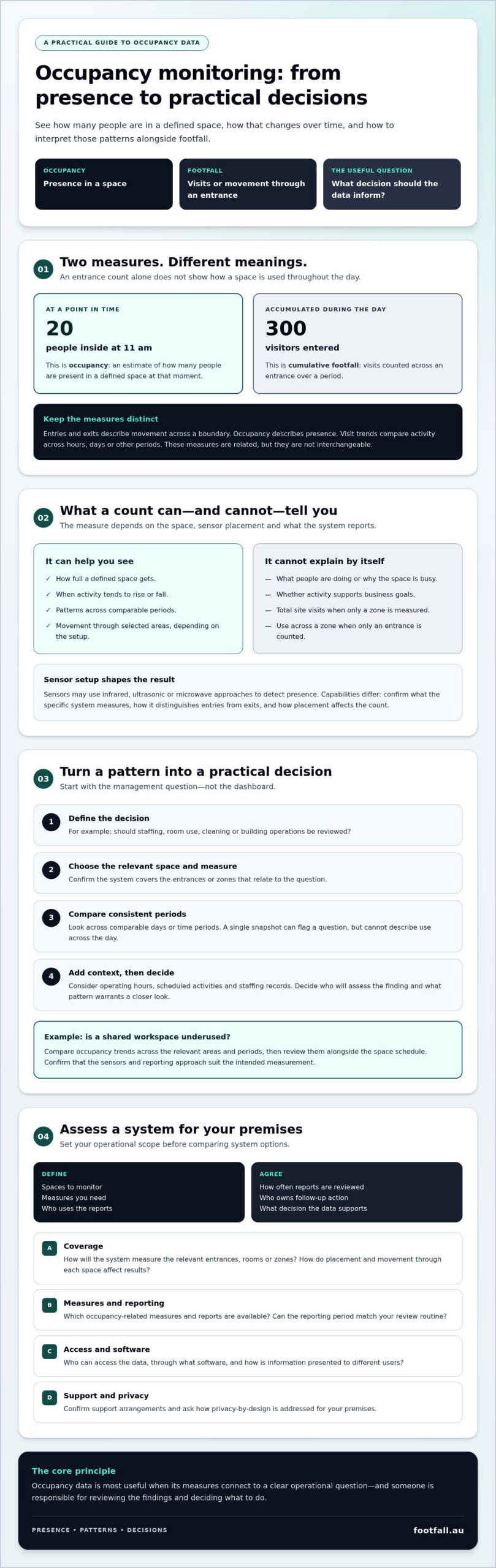
Imagine a shop with 20 people inside at 11 am, after 300 visitors have entered during the day. The first figure is occupancy at a point in time; the second is cumulative footfall. Entry and exit counts show movement across a boundary, while visit trends compare activity across hours, days or other periods.
What a count represents depends on where sensors are placed and what they measure. An entrance count won’t necessarily describe activity in a particular zone, and a zone count won’t show total visits to a site. When comparing options, ask how the system distinguishes entries from exits and how sensor placement may affect the count. For a broader explanation of people-counting approaches, see this people counting systems guide.
Sensor technology also shapes what is captured. An occupancy sensor may detect presence using approaches such as infrared, ultrasonic or microwave sensing, with applications including lighting and HVAC control. Check the specific system’s capabilities rather than assuming every sensor measures or reports the same way.
Counts describe activity, not intent or outcomes. A rise in occupancy may prompt a review of staffing or space use, but the figure alone can’t explain why the space is busier or whether that activity supports business goals. Interpret it alongside the operational question you’re trying to answer.
How to turn occupancy monitoring data into practical decisions
Useful occupancy data starts with a management question, not a dashboard. Define the decision you need to make, select the space relevant to it, review patterns across consistent periods, then decide whether an operational change is warranted. Before reviewing data, agree on what pattern would prompt a closer look and who will assess it.
Choose metrics that answer a specific facilities or operations question
Occupancy levels can help show how full a space gets, while time-based patterns can indicate when activity tends to rise or fall. If a shared area appears busy at certain times, compare its pattern across comparable days before considering staffing or room-use changes. A single snapshot can flag something to investigate, but it can’t describe use across the day. For ways to interpret movement data, see this footfall data analysis guide.
Before drawing conclusions, check that the system covers the relevant entrances or zones and that you’re comparing consistent measurement periods. Then consider context such as operating hours, scheduled activities and staffing records. A change in occupancy may have several explanations; supporting information can help distinguish a recurring pattern from an unusual day.
For example, if the question is whether a shared workspace is underused, compare occupancy trends across the areas and periods that matter, then review the results alongside how the space is scheduled. Confirm that the sensors and reporting approach suit the intended measurement. The U.S. Department of Energy’s resource on evaluating occupancy sensor performance offers technical context for assessing sensor test methods.
An occupancy monitoring system is most useful when its measures connect to a decision and someone is responsible for acting on the findings. Footfall Australia provides information about its people-counting hardware and analytics software at Footfall Australia’s website.
How to assess an occupancy monitoring system for your premises
Start with the decisions the system needs to support. Define the spaces you want to monitor, the measures you need, who will use the reports, how often they’ll review them and who owns any follow-up action. This scope helps you compare proposals against operational needs rather than a feature list. It also gives providers a clear basis for explaining how their proposed setup would measure the spaces you have in mind.
Questions to ask before selecting a monitoring solution
- Coverage: How will the system measure the entrances, rooms or zones relevant to your use case? Ask how placement and movement through each space affect the results.
- Measures and reporting: Which occupancy-related measures and reports are available, and can the reporting period match your review routine?
- Access and software: Who can access the data, through what software, and how is information presented to different users?
- Support and integration: What support options are available, and can the proposed setup meet any integration requirements? Confirm details rather than assuming compatibility.
- Privacy: Ask what information is collected, how it is handled and what privacy-by-design considerations apply to the proposed technology.
Review the people counting technology guide to understand the approaches available. Then verify that the proposed system can measure your intended spaces and provide data in a form your team can use. Ask for a clear explanation of how the setup handles the particular entrances or zones you want to monitor.
Footfall Australia supplies people-counting hardware and analytics software, including FootfallCam Pro2 People Counters, FootfallCam Centroid and FootfallCam V9 Software. The company has operated in Australia since 2004. Confirm how the capabilities of its products align with your requirements, including the measures, coverage and reporting you need.
Make occupancy data useful for your next decision
An occupancy monitoring system can reveal how presence in a space changes, but the value comes from connecting those measures to a clear operational question. Distinguish occupancy from footfall, review consistent patterns in the spaces that matter, and check that coverage and reporting support the decisions your team needs to make.
Before choosing a system, define the measures, users and review process you need, then confirm the provider’s capabilities, software, support and privacy approach. Footfall Australia supplies people-counting hardware and analytics software through a national network of local partners.
Discuss your occupancy measurement requirements with Footfall Australia. With a clear purpose and the right questions, you can assess your options and build a stronger evidence base for managing your premises.
Frequently Asked Questions
What is an occupancy monitoring system?
An occupancy monitoring system estimates how many people are present in a defined space and how that number changes over time. Depending on its setup, it may measure activity at an entrance or within selected zones. Businesses can use the resulting patterns to review space use and inform operational decisions, but the data alone doesn’t explain why people are present or what outcomes their activity produces.
How is occupancy monitoring different from people counting?
Occupancy monitoring focuses on presence in a space at a point in time or changes in that presence. People counting can measure movement, such as entries and exits, or visits over a defined period. These measures are related, but they answer different questions: an entrance count may show how many people visited during a day, while occupancy estimates how many are inside at a particular time.
Can an occupancy monitoring system help manage staffing?
Yes, occupancy patterns can help inform staffing plans by showing when spaces tend to be busier or quieter. For example, a facilities team could compare recurring patterns with staff schedules before considering changes to coverage. Treat the data as one input, not a staffing instruction: check that the system covers the relevant areas and consider operating hours, scheduled activities and other business context.
Does occupancy monitoring identify individual people?
Not necessarily. The purpose may be to estimate presence or count movement rather than identify individuals, but what a system captures depends on its technology and configuration. Ask the provider what information is collected, whether images or identifying details are involved, how data is accessed and handled, and what privacy-by-design measures apply. Verify these specifics for the proposed system before deployment.