

People Counter Installation Guide for Australian Businesses
National CBD foot traffic in Australia has rebounded to 94% of pre-pandemic levels as of late 2025, signaling a robust return to physical retail environments. While this volume presents immense opportunity, capturing it requires more than just mounting a sensor near the door. You likely understand that accurate data is the backbone of strategic growth, yet it’s common to worry about poor data quality or messy cabling disrupting your store’s aesthetic. This people counter installation guide provides the technical and strategic roadmap needed to transform physical movement into actionable business intelligence. We’ll explore how to achieve 98% accuracy through precise positioning and explain the benefits of a single-cable PoE setup. You’ll also learn to validate your metrics using FootfallCam V9 Software, ensuring your decisions are always backed by empirical evidence rather than intuition.
Key Takeaways
- Identify optimal counting lines and calculate precise mounting heights to ensure 3D depth perception functions correctly for high-accuracy tracking.
- Follow this people counter installation guide to streamline hardware setup with Power-over-Ethernet (PoE), reducing cabling complexity to a single connection.
- Access FootfallCam V9 Software to perform real-time video validation and manual accuracy audits, confirming your digital metrics match physical reality.
- Transition from outdated sensors using the Legacy Swap Out Plan to establish a reliable foundation for data-driven operational optimization.
Optimising Placement: The Strategy Behind People Counter Positioning
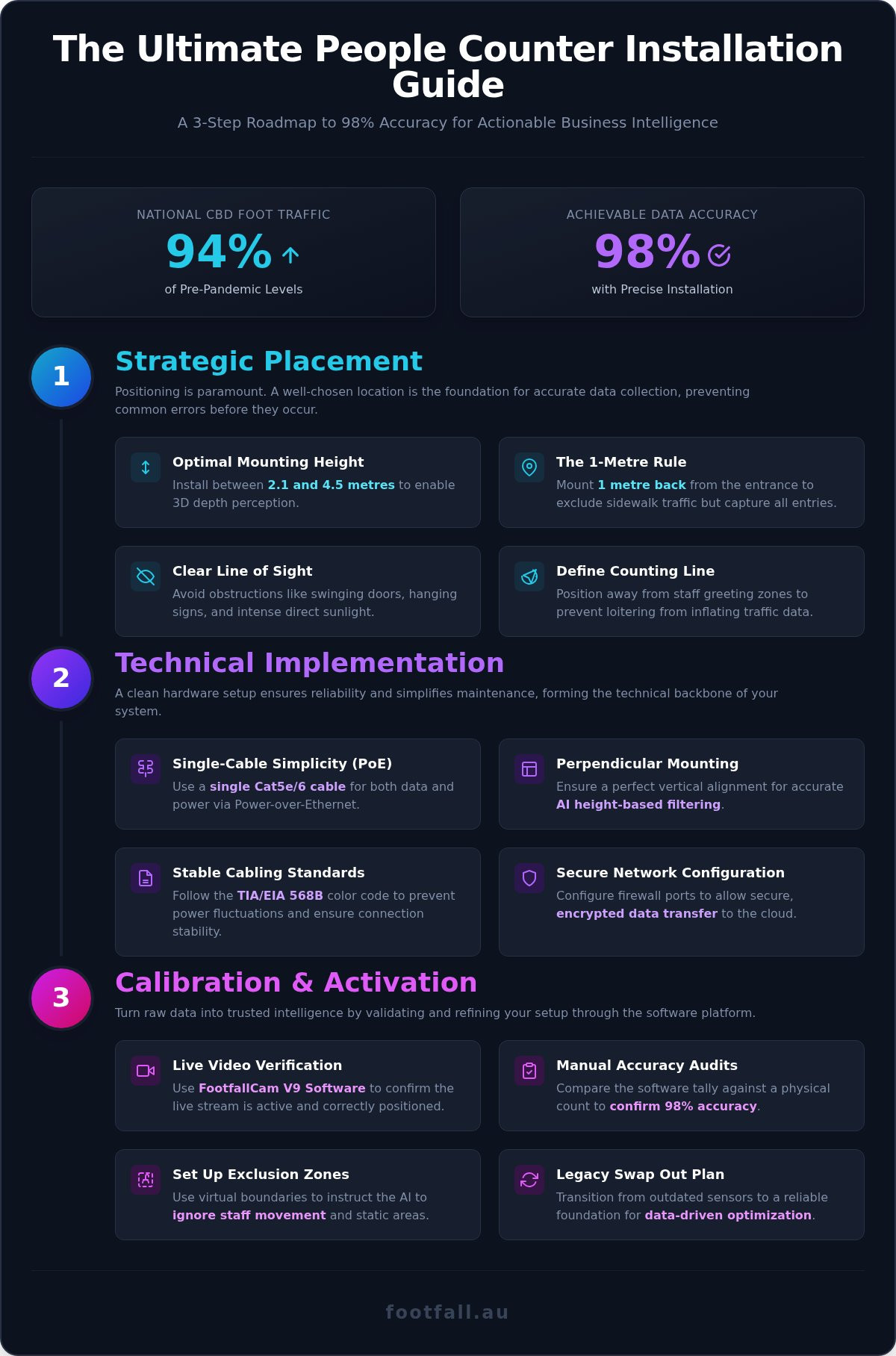
Effective data collection begins long before the first bracket is mounted. This people counter installation guide prioritises strategic placement because even the most advanced hardware cannot compensate for a poorly chosen location. Start by identifying your primary counting line. This is the specific threshold where customer traffic is most consistent and predictable. Position your sensor away from staff greeting zones or high-dwell areas to prevent loitering from inflating your figures. Data is only valuable if it accurately reflects customer intent.
Accuracy depends on maintaining a clear line of sight. Avoid common physical obstructions such as swinging doors, hanging signage, or decorative fixtures that might enter the sensor’s field of view. Additionally, be mindful of intense direct sunlight in Australian storefronts, which can occasionally interfere with certain people counting technologies. Mounting height is equally critical. You must calculate the distance from the floor to ensure the 3D depth perception of the FootfallCam Pro2 functions effectively, typically requiring a ceiling height between 2.1 and 4.5 metres for optimal results.
The 1-Metre Rule and Field of View
Standard industry practice suggests mounting your device approximately 1 metre back from the entrance. This distance prevents the sensor from accidentally counting passers-by on the sidewalk while ensuring it captures every person entering the space. The FootfallCam Pro2 features a sophisticated wide-angle lens designed to maximise coverage. However, your total field of view expands or contracts based on ceiling height. Understanding this relationship allows you to centre the device perfectly, ensuring no blind spots exist at the edges of your entrance. Following these placement protocols guarantees that the metrics you eventually see in the FootfallCam V9 Software reflect true human movement.
Technical Implementation: Installing the FootfallCam Pro2 Hardware
Technical precision defines the success of your hardware setup. While some providers suggest battery-powered sensors, these often lack the 98% accuracy required for high-stakes business decisions. This people counter installation guide recommends the FootfallCam Pro2, which utilises Power-over-Ethernet (PoE) to combine data and power into a single Cat5e or Cat6 cable. This approach simplifies installation across Australian infrastructure by removing the need for separate power outlets at every entrance.
Mount the bracket securely to the ceiling or a dedicated mounting arm. Ensure the device sits perfectly perpendicular to the floor. This vertical alignment is vital for the sensor’s AI to perform accurate height-based filtering, allowing it to distinguish between adults, children, and inanimate objects like shopping trolleys. Once fixed, connect the device to your local network to initiate the “Plug and Play” discovery process. If you’re currently managing outdated or inaccurate sensors, our Legacy Swap Out Plan offers a structured transition to this more reliable hardware.
Cabling Standards and Network Configuration
Reliable data transmission depends on correct termination. Following the TIA/EIA 568B colour code is critical for PoE stability in Australia, as it prevents the power fluctuations that often plague poorly crimped connections. Beyond the physical layer, your IT team must configure specific firewall ports to allow secure, encrypted data transfer to the cloud analytics platform. This step ensures that raw movement data is safely offloaded for processing without compromising your internal network security. By establishing this robust technical foundation, you guarantee that the human behavior captured at the door is accurately translated into digital insights.
Calibration and Software Activation: Turning Hardware into Insights
Successful mounting is only the first phase of a professional setup. This people counter installation guide concludes with digital calibration, the critical process that ensures your physical traffic translates into reliable business intelligence. Access the FootfallCam V9 Software to verify the live video stream immediately after the device is networked. Perform manual accuracy audits by comparing the counter’s live tally against a physical count of visitors during a peak period. This verification step confirms the 98% accuracy baseline and builds the necessary confidence in your data-driven decisions.
Refine your reporting by setting up exclusion zones within the software interface. These virtual boundaries instruct the AI to ignore staff members or security guards who regularly enter the frame, preventing internal movements from skewing your store’s conversion rates. To maintain long-term reliability, schedule automated health checks. These background protocols ensure the system remains online and accurate 24/7, alerting your team to potential network disruptions or hardware issues before they impact your historical reporting.
Fine-Tuning the AI for High-Traffic Environments
High-traffic Australian retail environments often require precise counting line adjustments to handle complex movement patterns. For multi-lane entrances or wide mall corridors, you can configure multiple counting lines to track directional flow with granular detail. The FootfallCam Pro2 uses advanced AI to distinguish between adults, children, and objects like shopping trolleys or strollers. This sophisticated filtering ensures your final reports in FootfallCam V9 Software reflect actual customers rather than generic movement. Once these parameters are set, your system is ready to provide the empirical evidence needed for strategic operational growth.
Establishing a Foundation for Data-Driven Growth
Establishing a foundation for data-driven growth requires precise execution at every stage of the setup process. By following this people counter installation guide, you’ve moved beyond simple hardware mounting to creating a sophisticated system for capturing human behavior. Accuracy isn’t accidental; it’s the result of strategic positioning, robust PoE implementation, and rigorous software validation within FootfallCam V9 Software.
If you prefer to focus on your core operations while ensuring peak system performance, Footfall Australia is here to help. We bring over 20 years of experience in people counting systems Australia and offer a national network of certified installation partners. Our people counter support plans include a 98% accuracy guarantee to ensure your data remains a reliable asset. Contact Footfall Australia for professional installation support today and begin transforming your physical traffic into empirical evidence for strategic expansion.
Frequently Asked Questions
Do I need a professional electrician to install a people counter in Australia?
You don’t necessarily need a licensed electrician for the device itself because the FootfallCam Pro2 operates on Power-over-Ethernet (PoE), which is low voltage. However, Australian regulations require an ACMA-licensed data cabler for any permanent structured cabling installations involving Cat5e or Cat6 lines. Following this people counter installation guide ensures you meet local standards while maintaining a clean, professional setup for your business.
Can people counters be installed on high or sloped ceilings?
Yes, you can install sensors on high or sloped ceilings using dedicated mounting hardware. The FootfallCam Pro2 is effective at heights between 2.1 and 4.5 metres. If your ceiling is sloped, you must use a mounting arm to ensure the device remains perfectly perpendicular to the floor. This vertical orientation is vital for the AI to accurately calculate depth and filter traffic by height.
What network bandwidth is required for a FootfallCam Pro2 installation?
Bandwidth requirements are exceptionally low because the device processes data locally on the edge. It doesn’t stream continuous video to the cloud; instead, it only uploads small text-based data packets and occasional snapshots for accuracy verification. This efficient data management ensures your network remains fast and stable while providing the high-frequency metrics required for detailed analysis in the FootfallCam V9 Software.
How do I troubleshoot a people counter that has gone offline?
Start by verifying the physical connection at your PoE switch or injector to ensure the device is receiving power. If the hardware is powered but not reporting, check your local firewall settings to confirm that the necessary ports for data transfer remain open. You can also run a remote diagnostic through the FootfallCam V9 Software. If issues persist, our Premium Support Plan provides expert technical assistance.