The Ultimate People Counter Maintenance Checklist for 2026
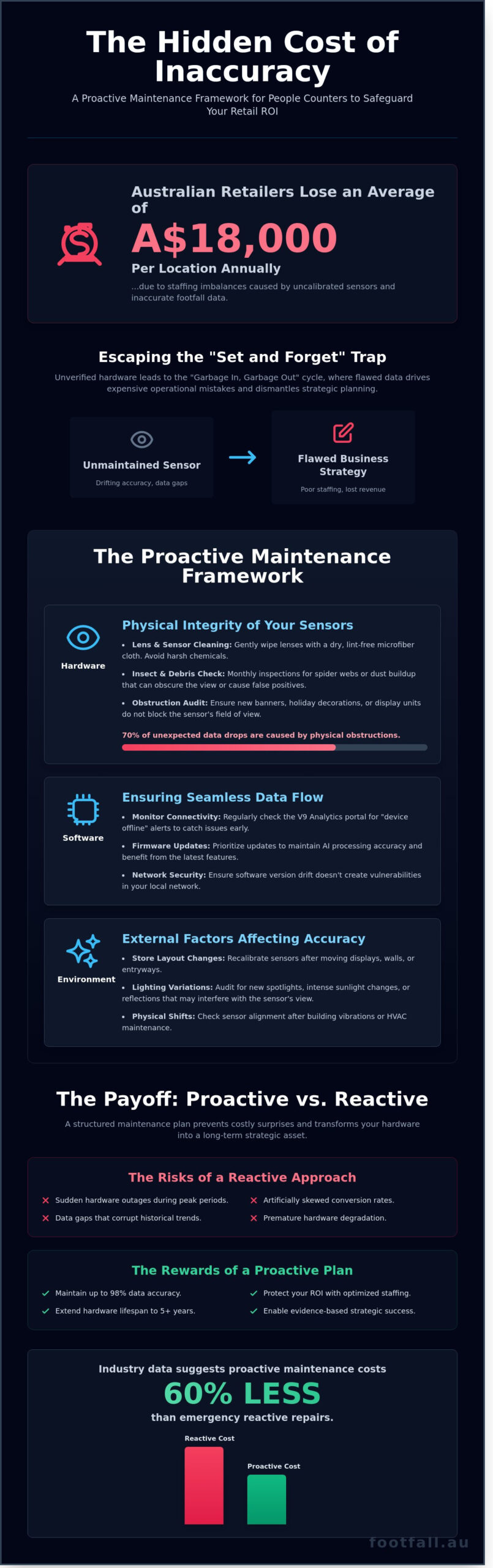
A 2024 industry audit revealed that Australian retailers lose approximately A$18,000 per location annually due to staffing imbalances caused by uncalibrated sensors. What if the data driving your most critical operations is quietly drifting toward inaccuracy? You already know that precise visitor analytics are the foundation of your ROI reporting and spatial strategy. To maintain this competitive edge, implementing a rigorous people counter maintenance checklist isn’t just a technical task; it’s a financial safeguard for your hardware investment.
We understand that sudden device offline alerts and hardware degradation represent more than just a technical nuisance. They are blind spots in your business intelligence that can lead to poor staffing decisions and lost revenue. This article provides a professional, multi-layered maintenance framework designed to ensure 100% data accuracy while extending your hardware lifespan to reach the five-year mark and beyond. We will walk through a structured routine of lens optimisation, network stability audits, and environmental calibration to keep your system performing with quiet confidence throughout 2026.
Key Takeaways
- Understand why moving beyond a “set and forget” mindset is essential for maintaining the data integrity required for high-precision retail analytics.
- Protect your hardware investment by implementing a multi-layered people counter maintenance checklist that addresses physical obstructions and cleaning protocols for 3D Pro2 sensors.
- Ensure seamless data flow by monitoring the V9 Analytics portal for connectivity alerts and prioritising regular firmware updates to maintain AI processing accuracy.
- Learn how to conduct an environmental audit to identify store layout changes or lighting variations that may interfere with your sensor’s field of view.
- Discover when to leverage professional support or the Legacy Swap Out Plan to ensure your spatial analytics system remains a reliable asset for Australian business growth.
The Strategic Importance of a People Counter Maintenance Checklist
High-precision retail analytics rely on a simple truth: your strategy is only as robust as the numbers fueling it. A people counter provides the raw data for conversion rates, labor scheduling, and lease negotiations. However, the “set and forget” mentality remains a pervasive risk in the Australian retail sector. Relying on unverified hardware leads to the “garbage in, garbage out” trap, where flawed data drives expensive operational mistakes. Implementing a consistent people counter maintenance checklist ensures that every visitor counted reflects a genuine opportunity captured. Without this rigour, sensors become legacy hardware rather than active intelligence tools.
Sensor health directly dictates the accuracy of your sales conversion rates. If a sensor undercounts due to a lens obstruction, your conversion rate appears artificially inflated. This creates a false sense of security regarding sales team performance. Conversely, overcounting due to poor calibration suggests your store is failing to convert visitors, leading to unnecessary pressure on staff. Regular audits move your business away from guesswork and toward a foundation of evidence-based success.
Preserving Data Integrity for ROI
A minor 5% discrepancy in foot traffic data doesn’t just skew a spreadsheet; it actively drains your bottom line. For a standard Australian retail outlet, this level of inaccuracy can translate to over A$12,000 in lost staffing efficiency annually. High-performance sensors require calibrated environments to maintain the 98% accuracy levels expected in 2026. Professional people counter support acts as a safeguard for your initial technology investment. It transforms a hardware purchase into a long-term strategic asset by verifying that spatial analytics align with actual floor traffic. When data is precise, the ROI becomes visible through optimized rosters and improved capture rates.
The Consequences of Neglect
Neglecting your hardware leads to cumulative data gaps that dismantle historical trend analysis. In Australia, environmental factors like excessive dust or heat buildup in ceiling cavities often cause premature sensor degradation. Industry data suggests that proactive maintenance costs 60% less than emergency reactive repairs. A structured people counter maintenance checklist prevents sudden hardware failure and the resulting “dark periods” where business intelligence vanishes. Consider these common risks of a reactive approach:
- Sudden hardware outages during peak seasonal periods like Boxing Day.
- Thermal throttling in high-heat retail environments leading to laggy data transmission.
- Software version drift that creates vulnerabilities in your local network security.
- Physical shifts in sensor alignment caused by building vibrations or HVAC airflow.
Moving from a reactive to a proactive stance is the hallmark of a smart strategist. It ensures that your visitor journey remains a clear narrative rather than a fragmented set of statistics. By prioritizing the health of your sensors, you’re not just maintaining equipment; you’re protecting the integrity of your entire business strategy.
Hardware Maintenance: Physical Integrity of Your Sensors
Physical integrity serves as the bedrock of any people counter maintenance checklist. Without a clear line of sight, even the most advanced AI processors fail to deliver accurate spatial analytics. Data audits from 2024 indicate that physical obstructions account for nearly 70% of unexpected data drops in retail environments. If a sensor can’t see the floor, it can’t see your customers.
Lens and Sensor Cleaning Protocols
Optical lenses on units like the FootfallCam 3D Pro2 require pristine surfaces to distinguish between human shapes and background noise. Dust accumulation in high-traffic Australian shopping centres can degrade accuracy by 5% within a single quarter if left unmanaged. Use a dry, lint-free microfiber cloth to wipe the lenses gently. Avoid harsh chemical cleaners that might strip sensitive anti-reflective coatings.
Insects represent a specific challenge for Australian businesses. Spiders often favour the warmth of ceiling-mounted sensors, spinning webs that trigger false positives or obscure the field of view entirely. Monthly inspections prevent these biological glitches from skewing your conversion rates. Adhering to professional standards for sensor maintenance and calibration ensures your hardware operates within its intended technical tolerances for long-term reliability.
Structural and Mounting Audits
Precision starts with positioning. A shift of just 5 degrees in a sensor’s tilt can lead to a 12% discrepancy in visitor counts. High-traffic entrances often experience subtle building vibrations from heavy doors or industrial HVAC systems. These movements can loosen mounting brackets over time, causing the device to drift from its calibrated height and angle.
Verify that the FootfallCam Pro2 remains securely fastened and level during your quarterly walk-through. Check the midspan power supply for signs of heat stress or cable wear. Frayed Ethernet cables or loose RJ45 connections often cause intermittent power cycles, which mimic software bugs but are actually physical failures. Replacing a damaged A$15 cable is a simple fix that prevents hours of data troubleshooting. Regular hardware reviews form a vital part of your people counter maintenance checklist, protecting the integrity of your visitor journey data.
If your team lacks the specialized equipment to reach high ceilings safely, consider booking a professional hardware audit to maintain your system’s precision and ensure every visitor is accounted for.
Software and Connectivity: Ensuring Seamless Data Flow
Data integrity relies entirely on the stability of your digital pipeline. Even the most precise hardware fails to deliver value if the information it gathers never reaches your reporting dashboard. A robust people counter maintenance checklist must prioritize the software layer to prevent data gaps that skew long term conversion trends. In the Australian retail landscape, where network reliability can vary between metropolitan hubs and regional centres, proactive monitoring is your best defence against data loss.
Portal Monitoring and Alert Management
Consistency begins with the V9 Analytics portal. Don’t wait for a monthly report to discover a sensor went dark three weeks ago. Configure automated email alerts within the portal to notify your IT team immediately if a device status changes to “Offline.” This immediate feedback loop allows you to address connectivity issues before they impact your weekly KPIs.
On-site staff should understand the physical indicators of device health. Direct your team to check the sensor’s LED status during routine floor walks. A steady Blue light typically indicates a successful cloud connection, while Green signifies active processing. A Red light is a clear signal of hardware or power failure. If the portal reports a device as offline but the LED remains Blue, the issue likely resides in local network firewalls or ISP disruptions rather than the sensor itself. Distinguishing between these two scenarios saves hours of unnecessary troubleshooting and technician call-out fees.
Firmware and AI Model Updates
The evolution of people counting technology is driven by software refinements that enhance accuracy in complex environments. Regular firmware updates are essential for maintaining the 98% accuracy standards expected in 2026. These updates often include refined AI models designed to better distinguish between human targets and inanimate objects like shopping trolleys or promotional displays.
- Staff Exclusion Refinement: Modern AI models use height, gait, and path detection to filter out staff movements. Regular updates ensure these algorithms adapt to new uniform colours or changing floor layouts.
- Data Packet Synchronisation: Updates often improve how sensors cache data during network outages, ensuring that once connectivity returns, the “burst” upload is synchronised correctly without duplicating counts.
- Scheduled Maintenance Windows: Always schedule firmware deployments during low-traffic periods, such as 2:00 AM AEST. This prevents data gaps during peak trading hours and ensures your people counter maintenance checklist doesn’t interfere with daily performance metrics.
Treat your software environment as a living system. By verifying data upload schedules and maintaining current firmware, you transform raw sensor output into the high-fidelity intelligence required for decisive business leadership.
The Environmental Audit: External Factors Affecting Accuracy
Precision in footfall analytics requires an awareness of the physical space. A sensor calibrated in January might underperform by June if the store environment shifts. Your people counter maintenance checklist must include a quarterly environmental audit to account for these variables. Data integrity relies on the sensor having an unobstructed, clear view of the visitor journey without interference from the surrounding architecture.
Spatial and Layout Considerations
Retail environments are dynamic. Moving a point-of-sale display or a security pedestal by as little as 30 centimetres can obstruct a sensor’s field of view. When store layouts undergo a refresh, sensors often require recalibration to redefine dwell zones and ensure the path of travel remains clear. In Australian luxury retail, the trend toward high-gloss porcelain or polished concrete flooring introduces a specific challenge. These surfaces reflect infrared signals, which can lead to double-counting or ghosting if the sensor’s sensitivity isn’t adjusted to account for the increased bounce-back. Managers should verify that any new floor treatments haven’t compromised signal clarity.
Lighting and Visibility Factors
Lighting conditions dictate the performance of video-based AI counters. In glass-fronted Australian shopping centres, extreme sunlight glare can reach levels of 100,000 lux, potentially washing out the sensor’s image. Maintaining consistent lighting levels is essential for AI algorithms to distinguish between a human shape and a moving shadow. Additionally, the installation of high-brightness LED marketing displays near the counting zone can introduce flicker or colour shifts that confuse older sensor models. A robust people counter maintenance checklist ensures these external light sources are mapped and excluded from the active counting area to prevent data skewing.
Staff behaviour remains a significant variable in the accuracy equation. Employees entering and exiting frequently can inflate footfall figures by 15% to 20% if exclusion protocols aren’t followed. Ensure staff exclusion buttons are tested monthly and that new team members are trained on their correct use. Seasonal decorations, particularly during the December peak or EOFY sales, often hang within the sensor’s perimeter. These objects create noise in the data, making it difficult to isolate genuine visitor journeys from inanimate movement. Regularly auditing the ceiling space for new signage or hanging displays prevents these common blind spots from degrading your analytics.
To ensure your hardware remains perfectly aligned with your physical space, you can optimise your store layout for data accuracy with our specialist consulting services.
Professional Support Plans: When to Call the Experts
Internal maintenance keeps your sensors physically clear, but technical integrity requires professional oversight. Your people counter maintenance checklist should include a clear threshold for escalating issues to data specialists. While on-site staff can wipe a lens, they can’t recalibrate AI algorithms or diagnose packet loss in a local network. Transitioning to a managed service model shifts the burden of accuracy from floor managers to dedicated analysts. This ensures that 98% accuracy levels are maintained across every location in an Australian retail fleet, regardless of local staff turnover.
Choosing the Right Support Tier
Selecting between basic and premium support depends on your operational complexity. Basic tiers usually cover hardware warranties and firmware updates. Premium plans provide proactive monitoring where experts identify anomalies before you even notice a data gap. Remote technical assistance resolves 85% of connectivity issues within hours, preventing long-term data loss. This level of professional monitoring ensures your footfall data analysis remains a reliable foundation for calculating conversion rates and staff rosters. Without this backbone, data drift leads to expensive errors in labor allocation.
The Legacy Swap Out Strategy
Hardware maintenance eventually hits a point of diminishing returns. If your existing sensors are over five years old, the cost of frequent repairs often exceeds the price of an upgrade. The Legacy Swap Out Plan allows Australian businesses to trade outdated technology for the FootfallCam Pro2. This 2026-ready hardware offers superior resilience against lighting changes and complex entrance layouts. Upgrading streamlines your operations by reducing the frequency of manual interventions. It’s a strategic move to ensure your people counter maintenance checklist stays short and manageable for the long term.
- Reduced Downtime: Managed services provide 24/7 alerts for sensor outages.
- Data Continuity: Professional health checks prevent gaps in historical data sets.
- Cost Efficiency: Predictable monthly support fees replace the volatility of emergency repair costs.
- Expert Calibration: Specialists adjust for seasonal changes in store layouts or decor.
Shifting from reactive fixes to a proactive professional plan transforms your footfall system from a simple tool into a strategic asset. It provides the quiet confidence that every business decision is backed by verified evidence. Investing in expert support ensures your technology evolves alongside shifting consumer trends in the Australian market.
Future-Proof Your Retail Intelligence
Precision in spatial analytics requires more than just high-end hardware; it demands a commitment to operational excellence. Adopting a structured people counter maintenance checklist ensures your sensors continue to deliver the high-level accuracy required for reliable conversion rate tracking throughout 2026. Regular audits of your physical sensors and connectivity protocols eliminate data gaps that can skew long-term strategic planning. Footfall Australia leverages 20+ years of Australian retail expertise to keep your systems running at peak performance. Our proprietary FootfallCam Pro2 technology is backed by a comprehensive national partner network, providing on-site assistance across the country whenever your team needs it. We focus on the technical details so you can focus on the visitor journey and evidence-based growth. Secure your data integrity and maintain a clear view of your business performance through every season. Optimise your system with a Footfall Australia Support Plan. Your commitment to accuracy today builds the foundation for smarter, more profitable decisions tomorrow.
Frequently Asked Questions
How often should I clean my people counter sensors?
Clean your sensors every 3 months to maintain optimal performance in standard retail environments. In high-dust locations like Australian shopping centres undergoing renovations, monthly cleaning is necessary. Dust accumulation can reduce lens clarity by 15% over a six-month period, which directly impacts the precision of your spatial analytics. Use a dry microfiber cloth to gently wipe the lens without applying excessive pressure.
What do the different LED lights on my FootfallCam device mean?
LED indicators provide immediate feedback on the operational status of your hardware. A solid green light confirms the device is powered and functioning correctly, while a flashing blue light indicates active data synchronisation with the cloud. If you see a red light, it typically points to a network connectivity issue or a hardware fault. You can verify the specific error code through your FootfallCam Analytic Manager dashboard.
Will my data be lost if the people counter goes offline?
Your data is protected by the device’s internal memory during network interruptions. FootfallCam sensors can store up to 30 days of visitor data locally. Once the internet connection is restored, the device automatically uploads the cached information to the server. This fail-safe ensures your conversion rates and historical trends remain 100% intact even during local ISP outages.
Can store decorations like balloons interfere with counting accuracy?
Helium balloons and hanging signs are common culprits for data discrepancies. These objects can sway into the sensor’s field of view, triggering false counts or blocking the path of real visitors. It’s a vital part of your people counter maintenance checklist to keep a 2-meter radius around the sensor clear of moving decorations. Maintaining this clear zone ensures the AI consistently delivers 98% accuracy.
Is firmware updating something I can do myself?
You can manage firmware updates remotely through the web-based portal. Most security patches and performance enhancements are deployed automatically by our technical team to keep your system aligned with 2026 standards. If a manual update is required, the process takes about 10 minutes. It’s best to schedule these updates after business hours to avoid any gaps in your live foot traffic reporting.
Why has my people counter accuracy suddenly dropped after a store refit?
Accuracy drops usually happen because the sensor’s original calibration no longer matches the new floor layout. Moving a counter by as little as 50cm or changing the floor material can disrupt the AI’s depth perception. You’ll need to perform a remote recalibration to account for the new environment. This step ensures the device correctly identifies the visitor journey through your updated entrance or walkway.
How do I know if my people counter needs a professional repair or just a reboot?
Perform a hardware reboot if the device stops sending data or appears offline in your dashboard. If the status LED remains red after two separate power cycles, it’s likely a hardware or Power-over-Ethernet (PoE) cabling issue. Our Australian support desk can run a remote diagnostic test to identify the fault. This prevents unnecessary call-out fees by confirming if the issue requires a physical technician or a software fix.
Does the FootfallCam Pro2 require different maintenance than older models?
The Pro2 features advanced 3D stereoscopic vision that requires less frequent manual adjustment than older 2D models. While legacy systems might need monthly checks, the Pro2 is built for a 12-month deep maintenance cycle. Including the Pro2 in your people counter maintenance checklist allows for more sophisticated dwell time tracking with minimal physical intervention. Its self-healing software automatically corrects many common sensor drift issues.