
People Counter Integration with POS: The 2026 Guide to Retail Conversion
In 2026, retailers leveraging AI and machine learning technologies reported a 10 to 16 percent increase in sales efficiency. This growth isn’t accidental; it’s the result of moving beyond raw numbers toward a streamlined people counter integration with POS. You likely understand the frustration of reconciling manual data entries between disparate systems, only to end up with conversion metrics that feel like educated guesses rather than hard facts. It’s difficult to justify marketing spend when the link between door traffic and the register remains blurred.
This guide demonstrates how to eliminate those blind spots by turning raw data into a transparent narrative of customer behavior. You’ll learn how to achieve automated reporting and real-time conversion rate tracking using FootfallCam V9 software. We’ll outline the steps to move from intuition to empirical evidence, ensuring your staffing and marketing decisions are backed by the quiet confidence of integrated analytics.
Key Takeaways
- Bridge the gap between traffic and sales by synchronizing visitor counts with transaction data to move beyond vanity metrics.
- Streamline operations through a people counter integration with POS, using secure API or SFTP protocols to automate data harvesting.
- Calculate critical performance indicators like Sales Conversion Rate and Average Transaction Value to measure the true ROI of your floor space.
- Utilize FootfallCam V9 software to generate intuitive reporting dashboards that turn technical metrics into strategic staffing and marketing decisions.
The Strategic Value of People Counter Integration with POS
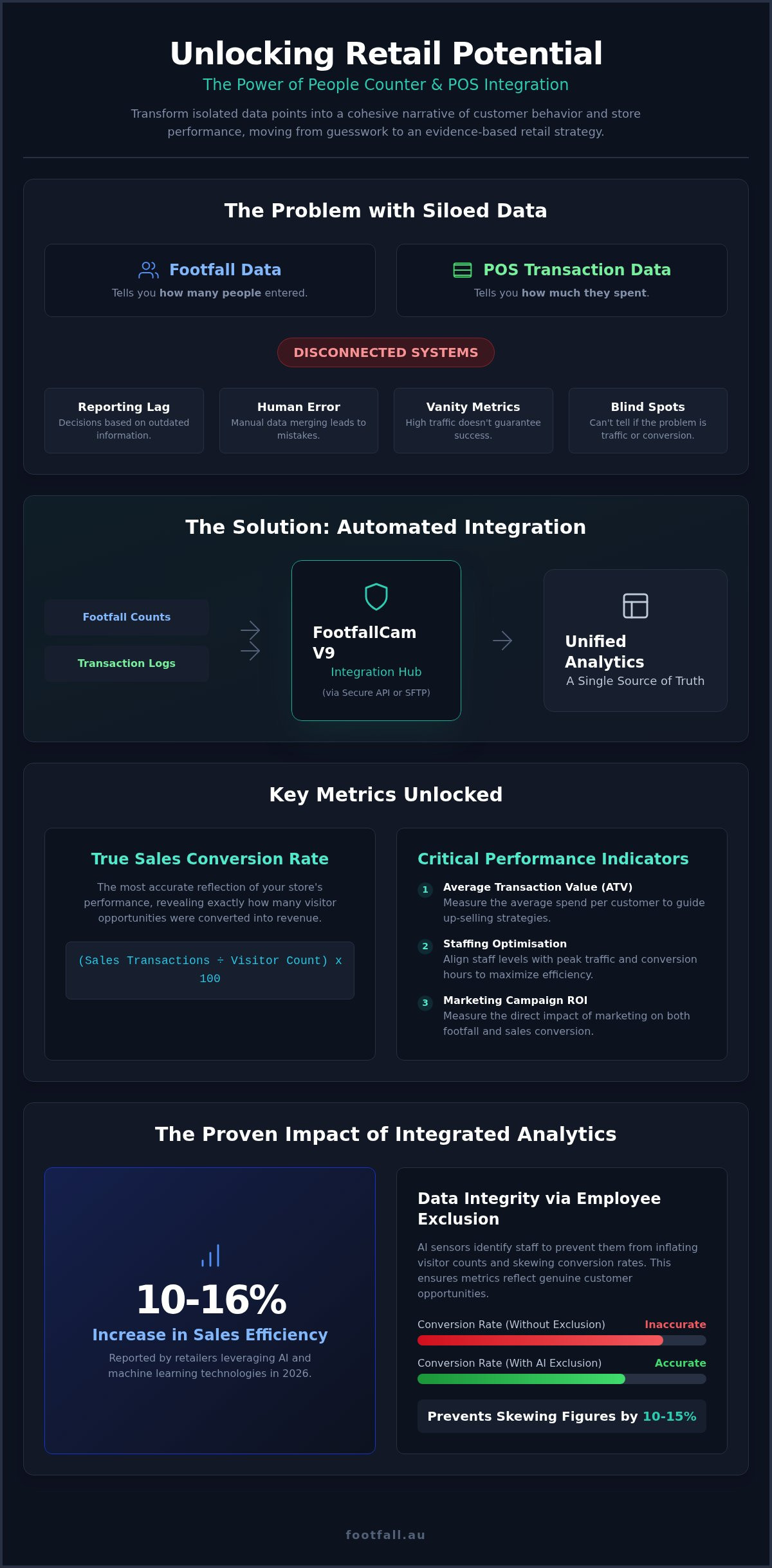
Raw footfall data tells you how many people entered your store; transaction data tells you how much they spent. Without a people counter integration with POS, these two datasets exist in isolation, offering an incomplete picture of retail health. High visitor counts are often treated as a success, yet they remain a vanity metric until they’re weighed against actual sales. Integration acts as the bridge that turns these separate numbers into a single, cohesive narrative of customer behavior.
Defining this integration is straightforward: it’s the automated synchronization of visitor traffic and transaction data. This process allows you to calculate the “True Conversion Rate” of your retail space. This metric is the most accurate reflection of floor performance, revealing exactly how many opportunities were converted into revenue. By linking FootfallCam Pro2 sensors with your existing transaction server, you move from intuitive management to an evidence-based retail strategy. You stop guessing why sales are down and start identifying whether the issue is a lack of traffic or an inability to close sales on the floor.
The Problem with Siloed Data
Disconnected systems create operational friction and lead to significant reporting lag. When data lives in separate silos, your team must manually merge spreadsheets, a process prone to human error and inconsistencies. For national retail chains, this manual approach is unsustainable and prevents a unified view of performance. There’s a persistent risk of misinterpreting high footfall as success during periods where conversion is actually plummeting. Automated people counter integration with POS eliminates these blind spots, ensuring that your data is both accurate and immediately actionable.
The 2026 Retail Landscape
Efficiency is the defining characteristic of the 2026 retail environment. Retailers are increasingly focused on hyper-efficiency, using data to justify every square meter of floor space. Integration supports sophisticated omnichannel strategies by helping managers identify “showrooming” behavior, where customers browse in-store but complete purchases online. Understanding these patterns requires real-time data for agile decision-making. Whether you’re adjusting staffing levels for a sudden surge or evaluating the ROI of a morning marketing campaign, having synchronized data allows you to respond to shifting behavioral trends with quiet confidence and empirical proof.
How Technical Integration Bridges the Gap Between Traffic and Sales
Technical synchronization relies on a precise data handshake between hardware and software. The FootfallCam Pro2 functions as the primary observer, capturing entrance events and transmitting them directly to the FootfallCam V9 software. Simultaneously, your POS server pushes transaction logs to the same environment. This automated data harvesting removes the need for manual intervention, effectively eliminating human error from the reporting pipeline. By validating data at the hardware level, you ensure every entry and exit is accounted for with scientific accuracy.
One critical component of this accuracy is employee exclusion. Without it, staff movements at the entrance can skew conversion figures by as much as 10 to 15 percent in smaller boutiques. The AI-driven sensors identify staff tags or specific behavioral patterns to filter these movements out. This ensures your sales metrics reflect only genuine customer opportunities, providing a foundation of integrity for your people counter integration with POS.
Hardware Precision with FootfallCam Pro2
The FootfallCam Pro2 uses advanced AI sensors to distinguish between individual customers, staff members, and groups entering together. This distinction is vital for maintaining the integrity of your data, as it prevents family units from being counted as multiple separate sales opportunities. These sensors maintain high-accuracy counting even in challenging environments, such as low-light evening hours or high-traffic holiday periods. For a deeper look at hardware capabilities, consult our FootfallCam Pro2: The Definitive Buying Guide for Australian Businesses.
The Software Layer: FootfallCam V9
Data is only as useful as your ability to interpret it. FootfallCam V9 software centralizes information from multiple national locations into a single, intuitive dashboard. This allows management to compare performance across different regions without toggling between multiple platforms. You can set customizable reporting intervals, such as hourly sales-to-traffic ratios, to identify peak performance windows or staffing gaps. Understanding these patterns is the first step toward sophisticated Footfall Data Analysis: A Strategic Guide to Actionable Insights.
Implementing these systems doesn’t require a total overhaul of your existing infrastructure. You can integrate our hardware and software with your current POS to start viewing these high-level metrics immediately, allowing you to focus on strategic growth rather than manual data entry.
Unlocking High-Level Metrics: Beyond Simple Footfall
The true value of a people counter integration with POS lies in its ability to transform a physical store from a “black box” into a transparent environment where every movement has a measurable outcome. While counting visitors provides a baseline, it’s the layering of transaction data that reveals the human narrative behind the numbers. You’re no longer just looking at a crowd; you’re evaluating the efficiency of your sales floor and the behavior of the people within it.
The Sales Conversion Rate (SCR) stands as the primary KPI for this evaluation. It represents the percentage of visitors who made a purchase, providing a direct assessment of store performance independent of external traffic fluctuations. By monitoring SCR in real-time, managers can distinguish between a “bad day” caused by low street traffic and a “bad day” caused by missed opportunities inside the store. This distinction is vital for maintaining a fair and accurate appraisal of store management and staff performance.
Analyzing Average Transaction Value (ATV) against footfall density helps identify the point of diminishing returns. High traffic density can lead to overcrowding, which often negatively impacts ATV as customers become overwhelmed or wait times at the register increase. Correlating dwell time with spending further refines this view. While it’s often assumed that longer browsing leads to higher spending, data frequently shows a “sweet spot” where engagement is high but hasn’t yet turned into frustration or fatigue.
Measuring Marketing Effectiveness
Marketing success shouldn’t be measured by entrance counts alone. By tracking the “Pull-in Rate”, you can see exactly what percentage of passersby were motivated by window displays or storefront promotions to enter. When you correlate specific marketing campaigns with real-time sales spikes through your people counter integration with POS, you gain the evidence needed to justify marketing spend. This verifiable ROI data allows for the reallocation of budgets toward high-performing strategies and the retirement of ineffective ones.
Optimising Store Operations
Data-driven operations allow for the identification of “Power Hours” where traffic is high but conversion remains unexpectedly low. These windows often reveal a mismatch between customer volume and available staff or a lapse in service quality. Using these insights, management can align rosters with peak traffic-to-sales ratios, ensuring that your best closers are on the floor when opportunity is highest.
Implementing this level of precision is a core component of Retail Footfall Analysis in Australia: A Strategic Guide to Data-Driven Growth. It empowers you to train staff on specific closing techniques for high-density periods, turning busy hours into profitable ones through objective, performance-based feedback.
Implementation Strategies: API, CSV, and Automated Data Sync
Successful people counter integration with POS depends on choosing a data transfer method that aligns with your operational rhythm. API integration represents the gold standard for retailers requiring real-time, bi-directional data flow. This method allows the FootfallCam V9 software to pull transaction data instantly, enabling managers to adjust floor strategies as shifts occur. When the system identifies a surge in traffic without a corresponding rise in sales, it triggers an immediate opportunity for intervention.
For organizations focusing on end-of-day analysis, FTP or SFTP uploads provide a secure, scheduled alternative. These batch transfers move data in encrypted packets at set intervals, such as every 24 hours, ensuring that daily reporting is ready for morning reviews. Smaller retailers or those with limited technical resources can start with CSV or Excel imports. While this requires more manual oversight, it serves as a functional entry point to understanding conversion metrics before scaling to more automated solutions.
If you’re operating with existing infrastructure, the FootfallCam Centroid acts as a vital technical bridge. It integrates legacy CCTV feeds into the modern POS ecosystem, allowing you to extract conversion data without the capital expenditure of replacing every camera on-site. This flexibility ensures that data-driven logic is accessible regardless of your current hardware age.
API vs. Batch Processing
Choosing between real-time API and batch processing depends on your need for immediacy. Real-time API is essential for immediate operational adjustments, such as opening a new register or redeploying staff during a sudden traffic surge. Batch processing is often sufficient for high-level strategic planning where long-term trends take precedence over minute-by-minute updates. Security remains a priority for data transfers in the Australian retail sector; both methods utilize encryption to protect sensitive transaction records while maintaining the utility of the information.
Compatibility and Scalability
Your chosen system must scale from a single boutique to a national fleet without compromising data integrity. A centralized approach ensures that as you add new locations, the people counter integration with POS remains consistent across the entire network. Working with local partners facilitates a seamless on-site technical setup, ensuring hardware is optimized for specific Australian store layouts. For a broader perspective on selecting the right infrastructure, see The Definitive Guide to People Counting Systems in Australia (2026).
If you’re ready to bridge the gap between your visitor counts and sales data, request a technical consultation to discuss the best integration path for your current infrastructure.
Optimising Retail Performance with FootfallCam V9 Software
FootfallCam V9 Software serves as the central intelligence hub for your people counter integration with POS, translating complex technical streams into visual action points. It moves beyond static reporting by providing automated alerts that notify management when conversion rates dip below established baselines or when traffic patterns deviate from historical norms. These proactive triggers ensure that operational friction is identified and resolved before it affects the day’s revenue. By centralising these metrics, the software provides the quiet confidence needed to manage national retail fleets with empirical precision.
Data continuity is the foundation of any successful retail strategy. Professional support and maintenance plans ensure that your data stream remains uninterrupted, protecting the integrity of your long-term analytics. Without consistent data, the ability to track seasonal trends or the ROI of specific marketing campaigns is lost. The V9 ecosystem is designed to maintain this continuity through a combination of robust software architecture and expert technical oversight.
The FootfallCam V9 Advantage
The software features a user-friendly interface designed specifically for store managers and regional directors rather than just data analysts. Cloud-based accessibility allows national management teams to oversee performance across all Australian locations from any device, ensuring a unified approach to retail strategy. Regular firmware updates are pushed automatically to ensure your FootfallCam Pro2 hardware remains compatible with evolving POS technology and cybersecurity standards. This ensures your people counter integration with POS stays functional as your other business systems upgrade.
Ensuring Long-Term ROI
Maintaining a high-performing system often requires addressing the limitations of older infrastructure. The Legacy Swap Out Plan provides a structured path for businesses to upgrade non-compliant or outdated hardware that cannot support modern integration requirements. To protect this investment, you can choose between Basic and Premium support plans, depending on the level of technical oversight your critical operations require. For more information on maintaining your system, see our guide on Comprehensive People Counter Support: Ensuring Data Integrity and ROI in 2026.
Auditing your current system for integration readiness is the logical next step toward retail transparency. Evaluate your transaction server’s export capabilities and ensure your sensor placement is optimized for AI-driven accuracy. This preparation ensures that when you activate the integration, the resulting insights are ready to drive immediate operational growth.
Advancing Toward a Data-Driven Retail Future
Transitioning from raw footfall counts to a fully realized people counter integration with POS is the final step in achieving total store transparency. By synchronizing visitor traffic with transaction data, you replace intuition with empirical evidence. This integration allows you to calculate the true conversion rate and optimize store rosters based on verifiable power hours. You’re no longer just observing movement; you’re interpreting human actions to drive specific, positive operational changes. It’s about moving beyond vanity metrics to understand the narrative of every customer journey.
Footfall Australia supports this transition through the high-level FootfallCam Pro2 AI accuracy and our extensive national technical support network. Our software solutions are compatible with major Australian POS providers, ensuring a seamless data handshake between your existing servers and our V9 reporting environment. We provide the technical bridge that turns raw data into actionable sales intelligence without requiring you to overhaul your entire infrastructure.
Request a POS Integration Consultation from Footfall Australia to audit your current infrastructure and unlock the narrative behind your customer traffic. Empower your management team with the tools to turn every entrance into a measurable opportunity for growth. The future of physical retail belongs to those who can measure it with confidence.
Frequently Asked Questions
How does a people counter integrate with my existing POS system?
Integration occurs through an automated data handshake using API, SFTP, or scheduled file uploads. The FootfallCam V9 software pulls transaction data from your POS server and synchronises it with visitor timestamps from the hardware. This process merges two distinct datasets into a single dashboard, providing a unified view of your retail performance without requiring manual data entry from your staff.
Can I see real-time conversion rates on my dashboard?
Yes, real-time conversion rates are available when you utilise an API-based people counter integration with POS. This configuration allows for a bi-directional data flow that updates your metrics at frequent intervals throughout the day. It empowers store managers to make immediate tactical decisions, such as redeploying staff to the sales floor during periods where traffic is high but conversion is lagging.
Do I need to change my POS provider to use FootfallCam?
No, you don’t need to change your POS provider to access advanced analytics. FootfallCam hardware and V9 software are vendor-neutral, meaning they’re designed to work with major Australian POS systems through flexible integration protocols. We provide the analytical layer and high-accuracy sensors while you continue to use the transactional infrastructure that already works for your business operations.
Likewise, if your operations are based in the Gulf region, you can check out AstraPOS for specialized POS hardware and software that integrates seamlessly with advanced analytics platforms.
How accurate is the sales conversion data if staff are walking in and out?
The data remains highly accurate because the FootfallCam Pro2 utilizes AI-driven employee exclusion technology. The sensors distinguish between staff movements and genuine customer visits by identifying staff tags or specific behavioural patterns. This filtering process ensures that your conversion metrics aren’t skewed by internal team activity, providing a foundation of empirical evidence for your strategic decisions.
What happens if my internet connection goes down?
Data continuity is protected by internal storage on the FootfallCam Pro2 hardware. The sensor caches visitor counts locally during an outage and automatically uploads the stored data once the connection is restored. Because the V9 software identifies the timestamps for these counts, it can accurately retrospectively match them with your POS transaction logs once the system is back online.
Is it possible to integrate people counters with legacy POS systems?
Integration is possible even with legacy systems that lack modern API access. We use secure FTP/SFTP batch transfers or automated CSV imports to bridge the gap between older transactional databases and our modern reporting environment. If your current counters are also outdated, our Legacy Swap Out Plan can modernise your hardware to ensure a stable people counter integration with POS.
How long does the integration process typically take for a retail store?
A standard integration project typically takes between one to two weeks from the initial technical audit to the final dashboard validation. This timeline includes the hardware configuration, the establishment of the data handshake, and a testing phase to ensure transaction data aligns perfectly with visitor timestamps. Larger national rollouts are managed through a structured schedule to maintain data integrity across all locations.
What is the cost of integrating a people counter with a POS?
Costs depend on the complexity of your POS data structure and the number of locations requiring synchronization. While we don’t provide fixed pricing for these technical services, the investment is scaled based on whether you require real-time API connectivity or daily batch processing. It’s best to discuss your specific infrastructure with a consultant to determine the most cost-effective path for your retail network.