
Footfall Report Template for Retailers: The 2026 Strategic Guide
While total UK footfall decreased by 10.7% in April 2026, 80% of all retail transactions still occur within physical stores. You likely find yourself drowning in raw sensor data without a clear way to prove its value to your stakeholders. It’s a common struggle to see visitor numbers fluctuate while failing to link those movements to specific sales conversions or staffing efficiencies. This lack of clarity often leads to missed opportunities in a market where 75% of shoppers now expect a seamless omnichannel experience.
This strategic guide introduces a professional footfall report template for retailers designed to turn complex human behavior into actionable intelligence. You’ll learn how to master the FootfallCam V9 Software Report Centre to create clear visualizations that justify every marketing dollar and operational shift. We’ll examine the essential metrics for 2026, from dwell time to spatial analytics, and provide a structured framework for evidence-based decision making. By the end of this guide, you’ll have the tools to transform raw traffic into a narrative of growth that resonates in the boardroom.
Key Takeaways
- Identify the critical difference between sales data and visitor behavior to accurately measure your store’s capture rate and overall attractiveness.
- Utilise a professional footfall report template for retailers to isolate peak hours and traffic volume, ensuring your highest-value windows are never under-resourced.
- Establish a tiered reporting cadence that provides store managers with daily tactical goals while giving regional leaders weekly strategic overviews.
- Solve the challenge of high traffic coupled with low conversion by using spatial analytics and dwell time data to refine store layouts.
- Eliminate manual data entry risks by leveraging FootfallCam V9 Software to automate the collection and visualization of complex visitor narratives.
Beyond the Spreadsheet: Why Retailers Need a Dedicated Footfall Report
Traditional spreadsheets often focus on what happened at the till, but that’s only half the story. Point-of-Sale (POS) systems record transactions, not visitors. If 80% of transactions still occur in physical stores as of 2026, relying solely on sales data ignores the vast majority of visitors who might’ve walked out empty-handed. A dedicated footfall report template for retailers bridges this gap by quantifying the “Capture Rate” and “Store Attractiveness” of a specific location. It transforms raw numbers into a narrative of human movement, showing exactly how marketing spend translates into physical entries. In the competitive Australian retail landscape, where consumer caution is high, this data-driven logic is the difference between guessing and growing.
The “Invisible” Customer: Measuring Missed Opportunities
Relying on modern people counting technology allows managers to see the “invisible” customer. These are the individuals who browse but don’t buy. Reporting on non-buyers is as critical as tracking transactions because it reveals leaks in your sales funnel. Perhaps your window display is attracting crowds, but your floor layout is causing friction. Capture rate is the percentage of passers-by who enter the store. By monitoring this metric, you can objectively measure whether your storefront is doing its job or if potential revenue is simply walking past your door. This level of insight is something a standard POS report can’t provide.
- Capture Rate: Measures the effectiveness of your window displays and storefront marketing.
- Turn-in Rate: Identifies if your store is attracting the right demographic from the street.
- Missed Opportunities: Quantifies the gap between total visitors and total transactions.
Stakeholder Alignment and Data Transparency
Transparency is vital for national operations. A structured report builds immediate trust with investors and head office because it replaces “gut feeling” with evidence-based management. When every store manager uses the same footfall report template for retailers, regional directors can compare performance across 50 or 100 locations with precision. It ensures that staffing decisions and marketing budgets are backed by hard evidence rather than anecdotal observations from the shop floor. This consistent reporting cadence is essential for maintaining operational efficiency as retailers invest more heavily in AI and automation throughout 2026. It creates a single source of truth that aligns every level of the business toward a common goal of optimization.
The Essential Components of a Retail Footfall Report Template
Building a robust footfall report template for retailers requires moving past total entry counts to decode the specific behaviours that drive revenue. A complete report must integrate traffic volume with temporal and spatial context. Total entries, exits, and real-time net occupancy provide the baseline, but the real intelligence lies in identifying peak hours and days. These high-value windows represent the moments when your store is under the most pressure and offers the greatest opportunity for growth. When you understand exactly when your customers arrive, you can align your resources to meet them.
Aligning traffic with transaction data reveals your Sales Conversion Rate. If your conversion is dropping while traffic remains steady, the issue likely resides in service levels or inventory availability. This is where staffing efficiency metrics become vital. By comparing hourly traffic loads to active staff hours, you can ensure your team is positioned to maximise every visitor interaction. Using a sophisticated reporting platform helps automate these comparisons, removing the guesswork from labour allocation and ensuring that your highest-paid staff are on the floor during the busiest periods.
Primary Metrics: The “Must-Haves”
Effective reports compare daily traffic trends against historical averages from the previous year or month. In high-end retail environments, calculating the Sales Per Visitor (SPV) metric provides a more nuanced view than total revenue alone. It measures the potential value of every person walking through the door, regardless of whether they buy. Additionally, integrating external variables like local weather or regional events into the narrative explains sudden anomalies. For instance, the 10.7% decrease in UK footfall recorded in April 2026 was a significant macro-trend; your report should reflect how such external factors impacted your specific site performance.
Advanced Insights: Spatial and Behavioural Data
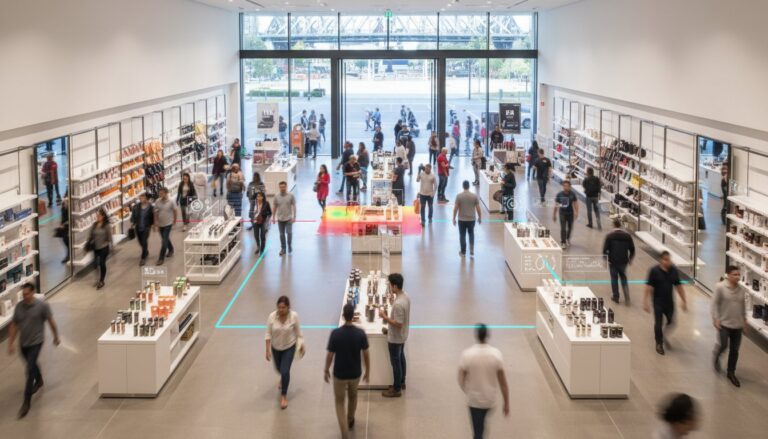
Advanced reporting includes the “Bypass Ratio” for specific high-value displays, measuring how many shoppers ignore a promotion versus those who engage with it. Tracking return visit frequency helps quantify brand loyalty by identifying re-entry data over a 30-day or 90-day period. This spatial data reveals exactly how visitors interact with your layout, identifying “dead zones” that require reconfiguration. Longer dwell times consistently correlate with increased basket sizes as customers spend more time discovering products across different zones. This behavioural narrative is essential for any footfall report template for retailers aiming to provide a complete picture of the visitor journey.

Daily, Weekly, and Monthly Reporting: Choosing the Right Cadence
Reporting frequency determines utility. A footfall report template for retailers must adapt to the user’s role to be effective. Store managers require immediate visibility to manage floor operations, while executives need high-level trends to guide capital expenditure. Choosing the right cadence ensures that data doesn’t just sit in an inbox but actually drives operational change. When reporting is aligned with decision-making cycles, it transforms from a static record into a dynamic strategic asset.
Weekly reports serve as the essential bridge between daily tactics and monthly strategy. Regional managers use these reviews to assess the impact of local marketing initiatives and promotional displays. If a specific campaign launched on a Tuesday, the weekly report clarifies whether that spend resulted in a measurable traffic lift. This allows for mid-month course corrections, such as reallocating marketing budgets from underperforming stores to those showing a high capture rate. It’s about maintaining a steady rhythm of optimization across the entire network.
The “Executive Summary” section of your report is the most critical component for C-suite alignment. It should condense hundreds of data points into three primary insights followed by three specific, evidence-based recommendations. Start with the most impactful metric, such as a shift in conversion rate or a change in average dwell time. Use direct language to explain the “why” behind the numbers. This structure respects the time of busy stakeholders while providing the hard evidence they need to approve larger strategic shifts.
The Daily Pulse: Operational Agility
Daily reporting focuses on operational agility. Identify your store’s “Power Hours” to ensure maximum floor coverage when traffic is highest. If your data shows a consistent surge at 2:00 PM, staffing breaks should be scheduled outside this window to avoid missed sales opportunities. These reports also help identify immediate anomalies. If a sensor shows zero traffic during peak hours, it’s likely a technical alert rather than a business trend. Live tracking allows sales teams to adjust their approach in real-time, pursuing short-term goals based on actual visitor volume rather than guesswork.
Monthly Strategic Overviews: Long-term Planning
Monthly reports are designed for long-term planning and seasonal benchmarking. With worldwide retail sales totaling $31.3 trillion in 2025, understanding your piece of that growth requires a broader perspective. Use retail footfall analysis Australia to benchmark your performance against national industry standards. Year-on-year comparisons are vital here to separate seasonal growth from genuine performance improvements. This long-term view helps evaluate the ROI of national marketing campaigns and provides the data necessary to justify store expansions or layout overhauls in the coming fiscal year.
Turning Data into Strategy: Using Your Report to Optimise Operations
A high-quality footfall report template for retailers serves as a diagnostic tool for your business health rather than just a record of entries. When you identify a “High Traffic, Low Conversion” scenario, you’ve pinpointed a specific operational leak. This discrepancy often suggests that while your marketing is successful, your in-store experience isn’t closing the deal. It allows you to investigate whether the issue is a lack of stock, poor staff training, or simply an overwhelmed team during peak periods. By addressing these friction points, you transform raw numbers into a clear roadmap for revenue growth.
Adopting the “Smart Strategist” approach means making one specific, measurable change per reporting cycle. Instead of overhauling your entire floor plan, use your zone dwell time reports to move a single high-margin display into a high-traffic area. If your heatmap shows that customers are consistently ignoring the back-left quadrant of your store, that’s a “Dead Zone” ripe for reconfiguration. This incremental method ensures you can isolate the impact of every adjustment, proving exactly which strategic shifts are driving your success as you move through 2026.
Staffing Optimisation and Labour Cost Management
Aligning your rosters with traffic peaks is the most direct way to reduce wait times and capture lost sales. When your report highlights consistent surges, you can adjust shift breaks to ensure maximum floor coverage during those critical windows. Conversely, identifying low-traffic periods allows you to redirect staff toward maintenance or stock-taking tasks without impacting the customer experience. For a deeper look at aligning your team with visitor demand, explore our guide on footfall data analysis. This level of precision prevents the “over-staffed and idle” or “under-staffed and frantic” cycles that drain retail profitability.
Marketing Attribution and Campaign Effectiveness
Your footfall report provides the missing link in marketing attribution by measuring the “Pull Factor” of your physical storefront. By tracking the ratio of new versus returning visitors, you can see if your digital ad spend is actually driving fresh traffic or simply engaging your existing loyalists. Correlating your promotional calendar with capture rate reporting reveals which window displays resonate most with passers-by. Retailers are also using these verified reports to negotiate fairer leases with landlords by providing hard evidence of actual precinct traffic versus promised visitor numbers. It’s about using evidence to gain a competitive advantage in every negotiation. Deploy a data-driven strategy today to ensure your marketing dollars are working as hard as possible.
From Manual Templates to Automated Intelligence with FootfallCam V9
Manual data entry is a relic of the past that introduces unnecessary risk into your strategic planning. When staff manually log visitor numbers into a basic footfall report template for retailers, they’re prone to errors that skew conversion rates and misinform staffing levels. These administrative tasks consume valuable hours that your team should spend on the shop floor engaging with customers. FootfallCam V9 Software eliminates this friction by automating the entire reporting lifecycle, from raw data capture to the delivery of polished executive summaries. It ensures your data is consistent, timely, and free from human bias.
The V9 platform provides a sophisticated Report Centre featuring over 60 templates designed for enterprise-grade deployments. You can customise dashboards for every level of a national network, ensuring store managers see tactical daily alerts while the C-suite receives monthly strategic overviews. As global AI spending is forecasted to exceed $2 trillion in 2026, the software moves beyond descriptive reporting. It utilises predictive AI-driven forecasting to help you anticipate traffic surges before they happen, allowing for proactive inventory and labour management across all locations.
The Power of the FootfallCam Pro2 Sensor
Reporting is only as reliable as the hardware that feeds it. The FootfallCam Pro2 sensor delivers 99.5% accuracy, ensuring your reports are bulletproof when presented in the boardroom. This level of hardware precision is the essential foundation for reliable people counting outcomes. When your sensors can distinguish between adults, children, and staff groups, your data reflects the true narrative of human movement within your space. This accuracy builds the trust necessary to make high-stakes investment decisions with total confidence.
Seamless Integration with POS Systems
True intelligence emerges when you bridge the gap between traffic and transactions. The V9 platform integrates with third-party data sources to automate conversion rate calculations within a single interface. This eliminates the need for external spreadsheets and fragmented BI tools, creating a single source of truth for your entire operation. By centralising your spatial analytics and sales data, you gain a transparent view of store performance that’s instantly actionable. It’s time to replace guesswork with a lexicon of measurement and strategy. Contact our Australian specialists for a tailored reporting demo to see how automated intelligence can transform your retail footprint.
Securing Your Competitive Advantage Through Data-Driven Precision
Transitioning from static spreadsheets to a sophisticated footfall report template for retailers is the first step toward true operational mastery. You’ve seen how identifying the “invisible” customer and aligning staffing with peak traffic hours can directly impact your bottom line. By leveraging automated intelligence, you remove the risk of human error and reclaim valuable time for strategic growth. This transition ensures that every decision, from marketing spend to floor layout, is backed by hard evidence rather than guesswork.
We’ve been a trusted partner for Australian retailers since 2004, providing the technological eyes needed to decode every visitor journey with 99.5% accuracy using FootfallCam Pro2 technology. Our full national support and maintenance plans ensure your reporting stack remains bulletproof as consumer trends shift through 2026 and beyond. It’s time to replace intuition with a lexicon of measurement and evidence-based success.
Download our professional retail reporting guide or request a demo to start transforming your traffic data into actionable growth strategies today. Your path to a more efficient, profitable storefront is just one report away.
Frequently Asked Questions
What are the most important KPIs to include in a retail footfall report?
Capture Rate, Sales Conversion, and Dwell Time are the most critical KPIs for any modern retail analysis. Capture rate measures storefront effectiveness by showing the percentage of passers-by who enter, while Sales Conversion links those entries to successful transactions. Including these metrics in your footfall report template for retailers allows you to isolate whether a performance dip is due to low street traffic or poor in-store engagement.
How often should I generate a footfall report for my retail store?
Generate reports daily for tactical store management and monthly for high-level executive reviews. Daily reports help store managers adjust shift breaks during identified power hours to ensure maximum floor coverage. Weekly reports allow regional managers to assess the impact of localized marketing campaigns, while monthly summaries guide long-term capital expenditure and national retail strategy.
Can I integrate footfall data with my existing POS system in the template?
You can integrate footfall data with your existing POS system using the FootfallCam V9 Software platform. This integration automates the calculation of conversion rates by merging transaction counts with visitor volume in real-time. It removes the need for manual data entry in external spreadsheets, creating a seamless, single source of truth for your store analytics and performance reviews.
What is a good sales conversion rate for Australian retailers in 2026?
A healthy sales conversion rate for Australian retailers in 2026 typically ranges between 15% and 25% for general retail, though luxury sectors often see lower rates paired with higher transaction values. Given that worldwide retail sales increased by 3.73% in 2025, maintaining a steady conversion rate is essential. It proves your team is successfully converting the traffic that 75% of omnichannel shoppers provide through physical store visits.
How do I distinguish between staff and actual customers in my reports?
Distinguish between staff and customers by utilizing FootfallCam Pro2 sensors equipped with advanced staff exclusion technology. These sensors use specialized exclusion tags or AI-based path filtering to remove employee movements from your final visitor counts. This ensures your conversion rates remain accurate and aren’t artificially deflated by staff members entering or exiting the premises during their shifts.
Should I include weather data in my footfall analysis reports?
Include weather data to provide essential context for sudden traffic fluctuations that might otherwise seem alarming. For example, the 10.7% decrease in UK footfall during April 2026 was largely influenced by external macro-factors and seasonal shifts. Linking local weather patterns to your reports helps stakeholders understand if a traffic dip was caused by a specific storm or a genuine decline in brand interest.
What is the difference between footfall volume and occupancy in reporting?
Footfall volume measures the total number of entries over a specific period, while occupancy represents the live density of people inside the store at any given moment. Volume is a metric for total opportunity and historical throughput. Occupancy is a critical tool for safety compliance and managing real-time service levels to ensure staff aren’t overwhelmed during peak periods.
How can a footfall report help me negotiate my retail lease?
Use verified footfall reports to prove that a specific precinct or shopping centre is delivering the visitor volume promised by the landlord. If actual traffic is 20% lower than the figures used to set your initial rent, you have the hard evidence required to support a lease renegotiation. This data-driven logic shifts the power balance from anecdotal guesswork to objective, documented reality.