Choosing the Best Visitor Counting System for Your Business
The most useful Visitor counting system isn’t simply the one that records the most entries. It’s one that turns dependable footfall data into decisions you can measure. If manual counts are inconsistent, staffing costs rise during quiet periods, or campaign results are difficult to assess, you may need better visibility into how people move through your space.
Choosing well means looking beyond the sensor. Consider how the system performs at your entrance, whether its analytics answer your business questions, how it can be compared with your existing data, and what support is available. This guide explains how to assess those factors and use foot traffic insights to review staffing, marketing performance, and conversion. You’ll also learn how FootfallCam V9 Software can organise visitor data for analysis, helping you move from raw counts to practical decisions.
Key Takeaways
- Assess a Visitor counting system as a combination of hardware and analytics software, not just a sensor at the entrance.
- Use traffic patterns to plan staffing around customer demand and compare footfall with existing sales data to assess conversion.
- Check how counting technology suits your entrance layout, ceiling height, and lighting conditions.
- Consider reporting clarity, system upkeep, and available support when evaluating long-term reliability.
The Architecture of a Modern Visitor Counting System
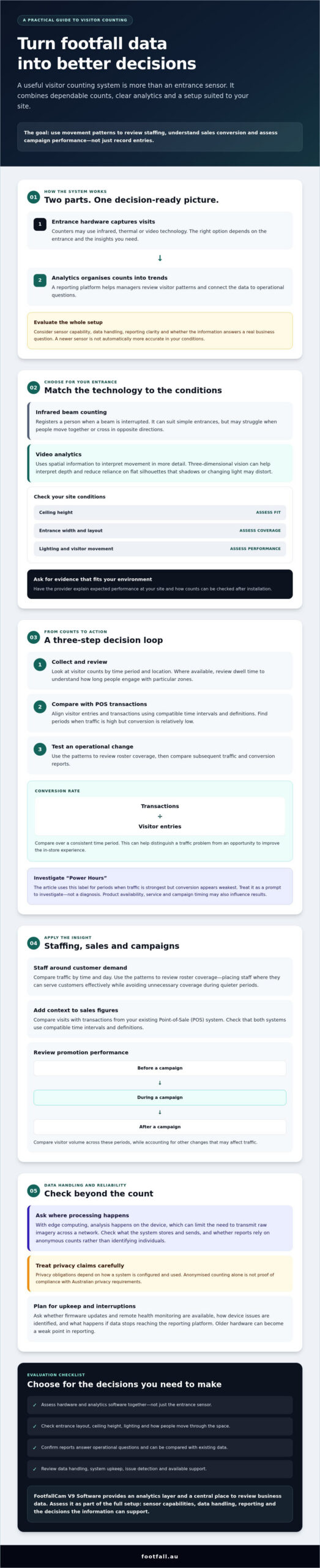
A Visitor counting system combines entrance hardware with software that turns movement into useful reports. The sensor captures visits; an analytics platform organises the counts into trends managers can review. A People counter may use infrared, thermal, or video technology. The right option depends on the entrance and the insights you need.
Basic infrared beam counters register a person when the beam is interrupted. They can suit simple entrances, but may struggle to distinguish people moving together or crossing in opposite directions. Video analytics can use spatial information to interpret movement in more detail. Compare systems based on their performance in conditions like yours rather than assuming a newer sensor will automatically be more accurate.
The Shift to AI Video Analytics
AI-enabled systems may distinguish visitor groups or separate staff from customers, but capabilities vary by model. FootfallCam Pro2 is proprietary FootfallCam hardware. Ask for documentation about its sensing and classification features, and check that they meet your site’s needs. Three-dimensional vision can help interpret depth, reducing reliance on flat silhouettes that shadows or changing light may distort.
Ask where processing happens. With edge computing, analysis is performed on the device, which can limit the need to transmit raw imagery across a network. Check what the system stores and sends, and whether reports rely on anonymous counts rather than identifying individuals. This supports privacy-conscious measurement, but privacy obligations depend on how a system is configured and used. Don’t treat anonymised counting alone as proof of compliance with Australian privacy requirements.
FootfallCam V9 Software provides an analytics layer for reviewing count data. Assess the whole setup together: sensor capabilities, data handling, reporting, and whether the information answers an operational question.
Transforming Foot Traffic into Actionable Business Intelligence
A count becomes business intelligence when it helps explain what to change. Compare traffic by time and day to see when visitor demand rises or falls, then use those patterns to review roster coverage. The aim isn’t simply to reduce labour. It’s to place staff where they can serve customers effectively while avoiding unnecessary coverage during quieter periods.
Footfall data can also add context to sales figures. Compare visits with transactions from your existing Point-of-Sale (POS) system to calculate a conversion rate for a consistent time period: transactions divided by visitor entries. Check that both systems use compatible time intervals and definitions. This footfall data analysis can help distinguish a traffic problem from an opportunity to improve the in-store experience.
Optimising Staffing and Conversion Rates
Use this three-step process to turn reporting into an operational decision:
- Data collection: Review visitor counts by time period and location. Where available, examine dwell time to understand how long people engage with particular zones.
- POS comparison: Align footfall and transaction data to find periods when traffic is high but conversion is relatively low.
- Roster adjustment: Test staffing changes against those patterns, then compare subsequent traffic and conversion reports.
FootfallCam V9 Software provides a central place to review business data. Use the available reports to investigate “Power Hours,” meaning periods where traffic is strongest but conversion appears weakest. Treat the label as a prompt to investigate, not a diagnosis. Product availability, service, and campaign timing may also influence results.
To assess promotions, compare visitor volume before, during, and after a campaign, while accounting for other changes that may affect traffic. Explore Footfall Australia’s visitor counting solutions as you consider how measurement could support these decisions.
Selecting and Maintaining a High-Performance Counting System
A reliable Visitor counting system starts with a good fit for the entrance. Check ceiling height, entrance width, lighting, and how people move through the space. A sensor suited to a narrow doorway may not cover a wide entrance effectively. Ask providers to explain how their recommended hardware is expected to perform in your site conditions and how you can check its counts after installation.
Reliability also depends on maintenance over time. Before choosing a provider, ask whether firmware updates and remote health monitoring are available, how device issues are identified, and what happens if data stops reaching the reporting platform. These questions can help you plan for interruptions instead of discovering missing data during a review. For information about people counting systems in Australia, see this guide to people counting systems Australia.
Lifecycle Management and Support Plans
Older hardware can become a weak point in otherwise useful reporting. Footfall Australia’s Legacy Swap Out Plan provides an upgrade pathway for older systems. FootfallCam Pro2 is another option to assess against your entrance requirements, reporting needs, and support arrangements.
Compare the Basic Support Plan and Premium Support Plan by checking the scope of each plan, how support requests are handled, and whether firmware updates or device monitoring are included. Don’t assume either plan guarantees a particular uptime. If you have a target such as 99% availability, ask whether it’s documented, how it’s measured, and what exclusions apply. Clear terms and a defined upgrade path help you plan for data continuity as your operations change.
Turn Better Measurement into Better Decisions
The right Visitor counting system connects dependable entrance data with reporting your team can use. Match the hardware to your site, use footfall patterns to inform staffing and campaign analysis, and consider support and system updates when planning for data continuity. Counts become more valuable when they lead to a practical next step.
Footfall Australia has worked in the Australian industry since 2004 and has a national network of local partners. Its FootfallCam Pro2 hardware and FootfallCam V9 Software bring counting and analytics together. The Basic and Premium Support Plans offer options to assess against your operational needs. When comparing systems, verify stated accuracy and uptime claims, and check how each is measured.
Explore Footfall Australia’s visitor counting solutions to find out how FootfallCam hardware and analytics software could help you understand physical foot traffic and inform business decisions.
Frequently Asked Questions
How accurate are modern visitor counting systems compared to manual tallies?
Modern automated counters can provide more consistent records than manual tallies, but accuracy depends on the technology, installation, and entrance conditions. Manual counts can miss or double-count people during busy periods or when several visitors enter together. Before relying on a Visitor counting system, ask how its accuracy is tested and compare sample counts with observed entry activity at your site.
Do visitor counting systems record identifiable video of customers?
Not necessarily. Some systems analyse video, while others use different sensor technologies. Data handling also varies by model and configuration. Ask whether images are captured, processed on the device, stored, or transmitted, and whether reporting contains only anonymous counts. Review the provider’s documentation and your own privacy obligations before deployment. Don’t assume that using a people counter automatically makes a setup privacy compliant.
Can I integrate my visitor counter with my existing POS software?
Potentially, if the counter’s analytics platform and your POS software support a compatible data connection. Integration can let you compare visitor entries with transactions over matching periods, but it doesn’t mean the counter provider supplies POS software. Confirm which data formats and connection methods are supported, whether integration requires configuration, and how missing or mismatched records are handled before selecting a system.
What happens if my visitor counting system loses its internet connection?
The effect depends on the device and its data-storage design. Some systems may continue counting locally and upload records after the connection returns; others may require connectivity for reporting or could leave a gap. Ask the provider whether counts are buffered, how reconnection and data synchronisation work, and how outages are flagged. Check these details before installation so you know how to respond.